


If you're searching for the best AI note taker for SimplePractice EHR, you usually want one of two outcomes:
- Draft high-quality clinical notes fast, then paste them into SimplePractice with minimal cleanup
- Keep workflows clean: consent, privacy, documentation formats, and predictable storage controls
This guide focuses specifically on best AI notes for SimplePractice and best AI for SimplePractice EMR workflows, not a generic "AI scribe" roundup (so it should not overlap with broad "best AI scribe" lists). See also our best AI for therapy notes.
How to choose AI notes for SimplePractice
When evaluating the best AI note taker for SimplePractice EMR, most clinicians end up comparing these criteria:
- Workflow fit: Does it work with your sessions (telehealth vs in-person), and can you get the output into SimplePractice fast?
- Edit time: A "good draft" that still takes 10 minutes to correct is not a win.
- Note formats: SOAP, DAP, BIRP, GIRP, intake, treatment plans, letters.
- Data controls: Audio retention, transcript retention, deletion controls, and whether data is used for model improvement.
- Consent: Whether the tool provides guidance or forms for consent when recording or using AI.
1. Twofold Health
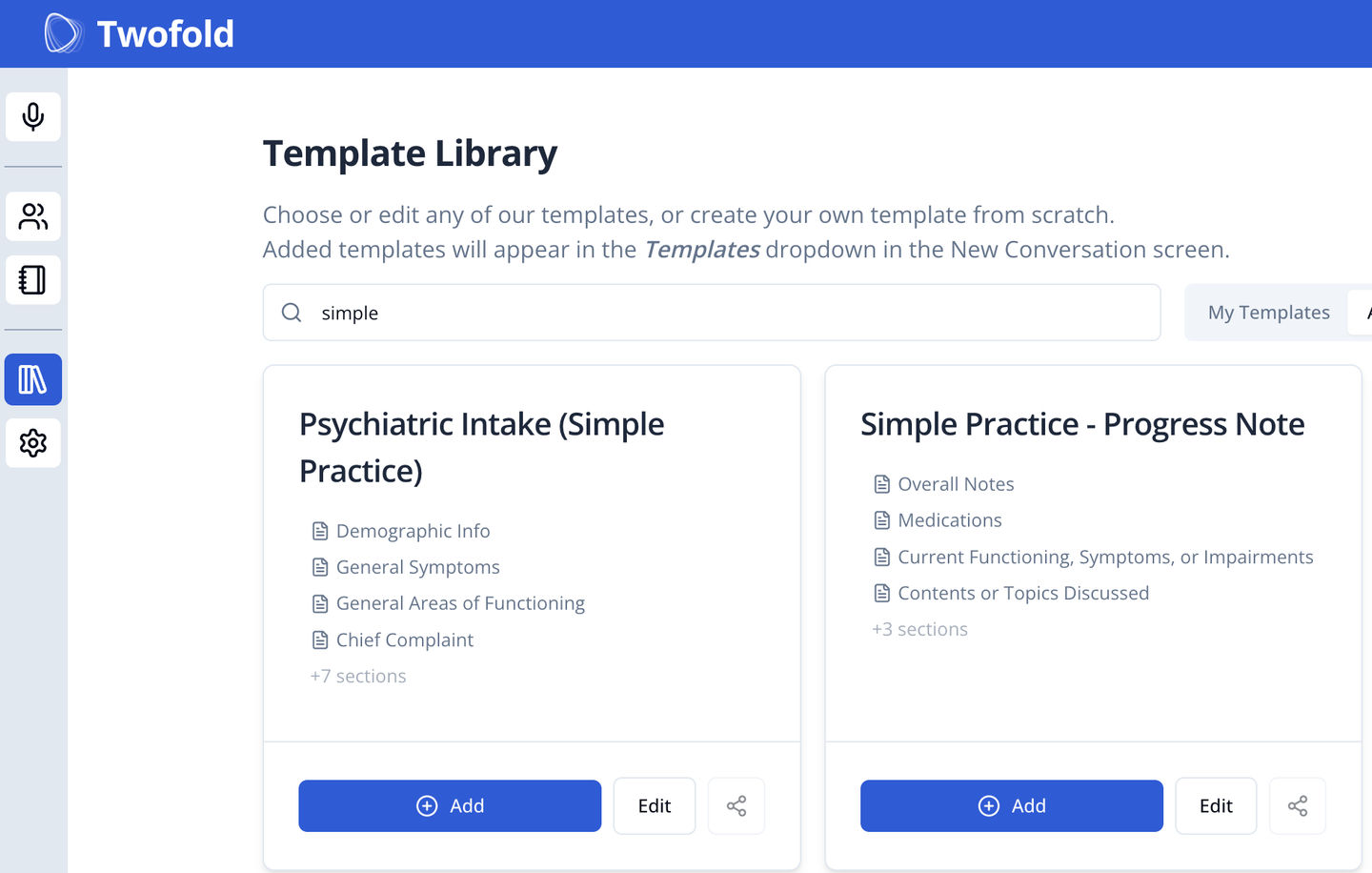
Twofold is a SimplePractice‑friendly option when you want high‑quality note drafts plus flexible templates, then copy and paste into SimplePractice without changing your EHR workflow. It's positioned as an AI documentation layer that can sit alongside existing systems (including SimplePractice) rather than replacing them.
What does it do?
- Generates structured clinical documentation (progress notes and related outputs) from a session workflow, designed to reduce after-hours documentation time.
Who is it for?
- Psychotherapists and mental health clinicians using SimplePractice who want AI notes for SimplePractice without needing EHR-native note tooling.
Key features
- Structured note outputs (multiple formats and templates)
- Fast "draft → edit → paste into EHR" workflow
- Custom templates and consistent formatting control (so notes look like your documentation style)
- Clear privacy and security controls and documentation
- Clear subscription pricing and trial availability
Pros
- Flexible output formats that adapt well to SimplePractice paste-in workflows
- Clear pricing and trial structure (easier to evaluate without procurement loops)
- Works alongside SimplePractice rather than requiring you to switch EHRs
Cons
- Not an in-EHR SimplePractice-native feature (you typically paste final content into SimplePractice)
Pricing
- $69/month monthly, or $49/month annual (paid upfront), with a free trial note allowance.
Privacy, HIPAA, BAA notes (vendor-stated, not legal advice)
- Twofold describes a HIPAA-focused posture and offers a Business Associate Agreement pathway.
What clinicians say (community links)
"I use a software called Twofold, amazing, subscription costs 49$ per month. Also trialed Quill, freed and upheal, Twofold was way simpler and notes are great" ‑ Fit‑Astronaut6464
Another reddit user says that:
"We chose Twofold after evaluating both Freed and Heidi for about a month." ‑ Proper_Parking_2461
2. SimplePractice AI Note Taker
SimplePractice's AI Note Taker is the most direct "inside SimplePractice" option because it is designed to work within SimplePractice's own Telehealth experience.
What does it do?
- Records audio during SimplePractice Telehealth sessions to generate a transcript and draft progress note inside SimplePractice.
Who is it for?
- SimplePractice users who primarily do SimplePractice Telehealth and want AI drafts that stay in the same system.
Key features
- Optional add-on that can be enabled per clinician
- Draft note generation tied to your prior note style for that client
- Transcript availability window (until note is locked/signed or 7 days)
- Consent guidance and an AI consent form option (where relevant)
Pros
- EHR-native draft workflow (no exporting to another app first)
- Designed specifically around SimplePractice documentation conventions
Cons
- Designed to work only with SimplePractice Telehealth, not external telehealth platforms
- Requires recording portions of the session for best output (and may require more edits if you record only some parts)
- Drafts may include mistakes or missing details and require clinician review (vendor states this explicitly)
Pricing (highest public tier)
- $35/month per clinician add-on after a 30-day trial.
Privacy, HIPAA, BAA notes (vendor-stated, not legal advice)
- SimplePractice references a BAA and states transcripts are private/secure during the availability window, plus describes future use of de-identified content for clinicians who do not opt out (as their opt-out solution develops).
What clinicians say (community links)
- https://www.reddit.com/r/SimplePractice/comments/1mf87zj/note_taker/ (Reddit thread that discuss early experiences, consent questions, and workflow fit)
- https://www.reddit.com/r/therapists/comments/1iybaol/simplepractice_ai_note_taker/ (Reddit thread about availability, workflow limits, and troubleshooting)
3. Blueprint AI
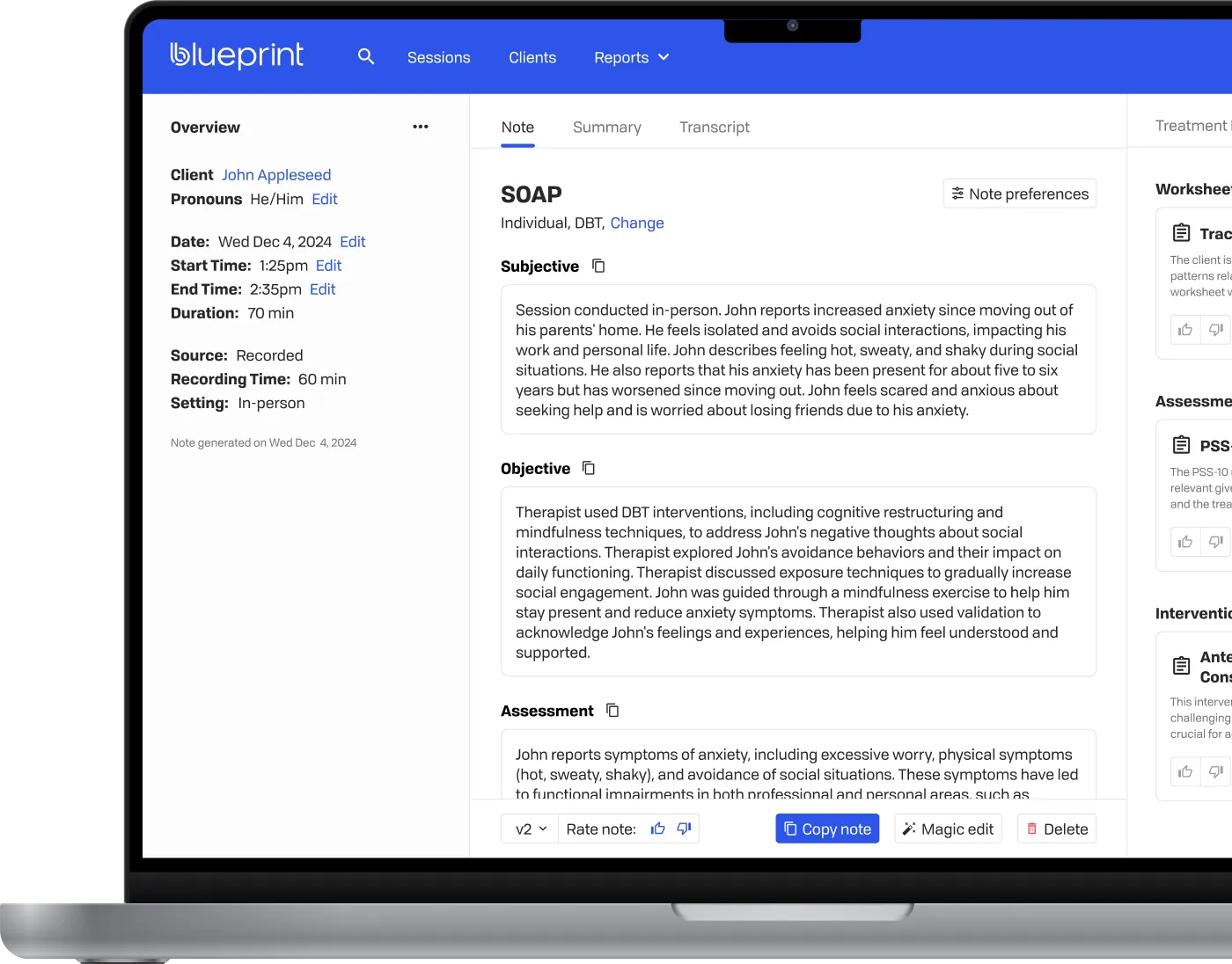
Blueprint is a per‑session documentation tool aimed at mental health clinicians. In SimplePractice workflows, it's typically used to generate a draft note and then paste the final version into SimplePractice.
What does it do?
- "Listens, transcribes and writes progress notes and treatment plans," with a per-session pricing model.
Who is it for?
- Clinicians who like per-session pricing and want explicit privacy controls and deletion options.
Key features
- Per-session plans (Core, Plus, Pro)
- Vendor-stated audio handling: "audio is processed in real-time and immediately discarded"
- User controls for transcript/note deletion and optional auto-delete settings
- Published BAA page
Pros
- Clear per-session pricing page (easy to estimate costs)
- Published privacy/security page with concrete claims about deletion and audio handling
Cons
- "Pro" is now generally available; some Pro sub-features (auto insurance coverage checks, claim follow-up, financial performance summaries) are still rolling out
- If your workflow is "notes directly inside SimplePractice," you will still be pasting content into SimplePractice
- As with any transcription-based tool, output quality can vary by mic setup, speaker overlap, and session structure
Pricing (highest public tier)
- "Pro" is generally available at $1.49 per session.
Privacy, HIPAA, BAA notes (vendor-stated, not legal advice)
- Blueprint states it is HIPAA compliant and that it signs BAAs, with a published BAA page.
What clinicians say (community links)
- https://www.reddit.com/r/therapists/comments/1j4h9tt/blueprint_ai_tool/ (discusses workflow fit, note formatting, and time savings claims)
4. Suki AI
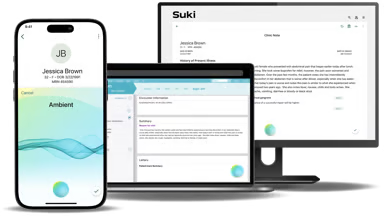
Suki is widely discussed as an "ambient documentation" product for clinical settings, and is often deployed through organizations rather than purely self‑serve individual workflows.
What does it do?
- Ambient clinical documentation and automation workflows, typically positioned for broader clinical settings and EHR-connected programs.
Who is it for?
- Clinics or organizations evaluating ambient documentation programs, especially where IT and integration support exists.
Key features
- Ambient documentation workflows and voice-driven documentation (vendor positioning)
- EHR integration focus (vendor positioning)
- Broader enterprise posture (common in how it's discussed publicly)
Pros
- Commonly discussed in the context of deeper EHR programs and organization-wide rollouts
Cons
- Pricing is not consistently public, often requiring a sales process
- For SimplePractice users, the "how do I get notes into SimplePractice quickly" question may still involve copy-paste, depending on deployment
- Ambient tools can introduce consent, recording, and retention questions that require careful internal policy alignment
Pricing (highest public tier)
- Suki pricing is typically not listed publicly in a single self-serve pricing table; plan details are usually via demo/sales.
Privacy, HIPAA, BAA notes (vendor-stated, not legal advice)
- Suki describes HIPAA-oriented security posture in public materials (verify your specific plan's BAA terms in writing).
What clinicians say (community links)
- https://www.reddit.com/r/FamilyMedicine/comments/1ggmdf8/thoughtsexperiences_working_with_ai_scribes/ (discusses pricing expectations and procurement friction)
- https://www.reddit.com/r/AIScribes/comments/1f8dp0a/post_about_your_ai_scribe_provider_freed_ai_suki/ (discusses integration expectations and where it fits operationally)
5. NoteMD
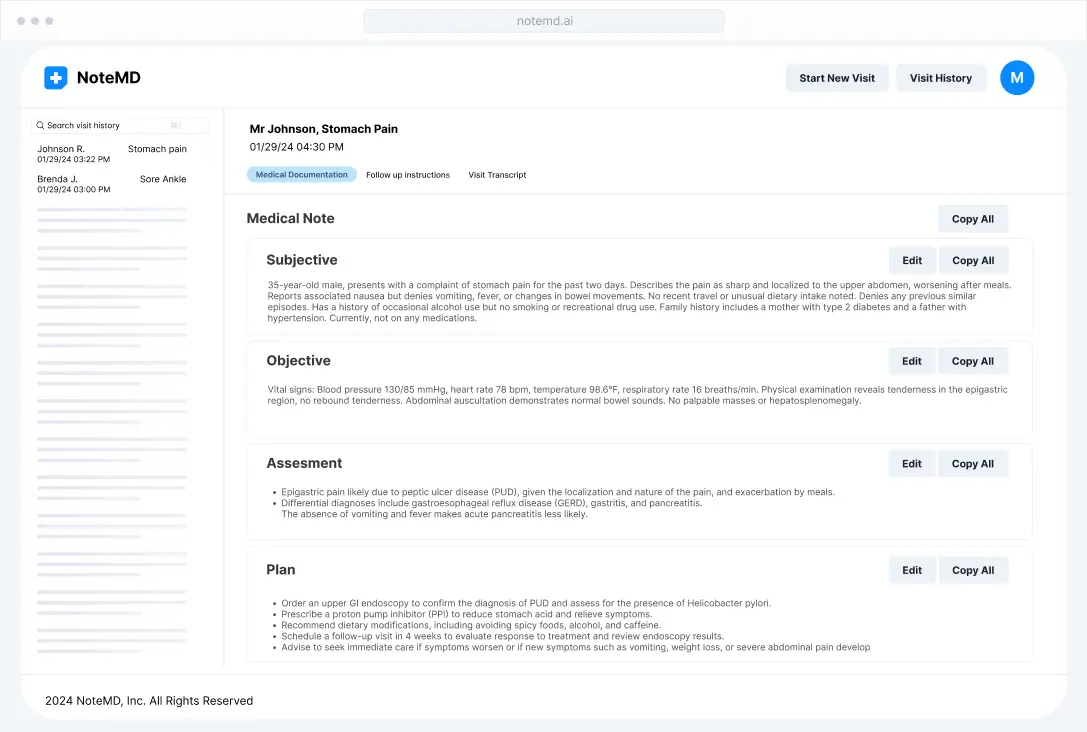
NoteMD shows up in clinician communities as a self‑serve AI scribe option, often evaluated by individuals looking for a faster documentation process.
What does it do?
- AI scribe workflow designed to produce clinical note drafts from encounters, typically for review and copy-paste into an EHR.
Who is it for?
- Clinicians who want a straightforward AI scribe flow and public monthly pricing.
Key features
- Public plan pricing for individuals
- Scribe-style drafting aimed at reducing manual note typing
- Typically used as "draft → edit → paste into EHR" in SimplePractice contexts
Pros
- Public monthly pricing makes it easier to trial and budget
Cons
- Community reports note occasional missed content and the need to verify output carefully
- If you want SimplePractice-native note creation, this is still an external tool workflow
- You will want to validate vendor-stated privacy claims against your clinic's policies and requirements
Pricing (highest public tier)
- $99/month (Pro) shown on NoteMD's pricing page.
Privacy, HIPAA, BAA notes (vendor-stated, not legal advice)
- NoteMD markets a HIPAA-focused posture (confirm BAA details and retention policies directly with the vendor for your use case).
What clinicians say (community links)
- https://www.reddit.com/r/medicine/comments/1b0befu/best_ai_medical_scribe_tools_do_people_use_them/ (mentions trying NoteMD, discusses accuracy and recording storage concerns)
6. BastionGPT
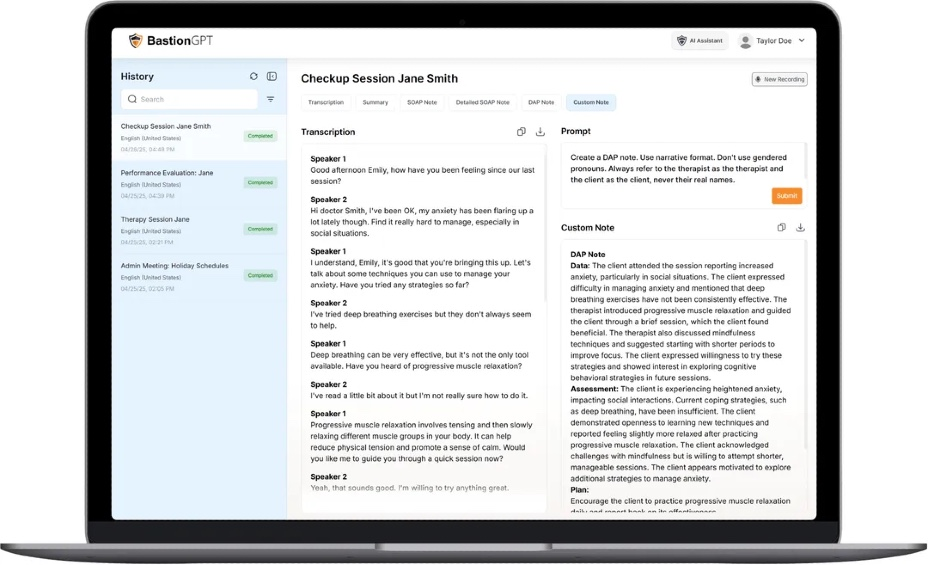
BastionGPT is typically used more like a HIPAA‑oriented AI workspace for drafting, summarizing, and rewriting content, rather than a SimplePractice‑native note taker.
What does it do?
- Provides an AI interface positioned around healthcare privacy and compliance, commonly used for drafting and transforming clinical text.
Who is it for?
- Practices that want a "secure AI workspace" to draft and clean up documentation before pasting it into SimplePractice.
Key features
- Vendor-stated BAA incorporated across plans
- Security/compliance FAQ page (HIPAA and other claims)
- Can be used for structured note rewriting (for example, convert raw text into a chosen format)
Pros
- Clear security/compliance messaging and a dedicated security page
Cons
- Community threads report mixed output quality for clinical note use cases depending on prompts and workflow
- Not a SimplePractice-native note tool, so you still rely on copy-paste workflows
- Published pricing can be inconsistent across sources, so confirm what applies to your plan and organization
Privacy, HIPAA, BAA notes (vendor-stated, not legal advice)
- BastionGPT states that all plans incorporate a BAA and describes HIPAA-oriented controls on its security page.
What clinicians say (community links)
- https://www.reddit.com/r/therapists/comments/1i9x48m/iso_recommendations_for_best_hipaacompliant_ai/ (mentions using BastionGPT for admin items like treatment plan drafting)
Conclusion (recommended starting point)
If your goal is the best AI for SimplePractice EMR and you want a practical, repeatable workflow, the most reliable approach for most clinicians is:
- Pick a tool that produces consistently structured drafts
- Review and edit quickly
- Paste into SimplePractice with minimal formatting cleanup
In that "SimplePractice‑friendly" lane, Twofold Health is the best default starting point for most clinicians because it's designed to work alongside your existing EHR workflow and offers a clear trial and pricing path.
If you already run nearly everything inside SimplePractice Telehealth or TherapyNotes, the native convenience of their add‑ons can be appealing, but it's still worth comparing edit time, retention controls, and the quality of the final note you actually sign.
Last reviewed: May 2026 — pricing tiers, plan availability, and vendor positioning in this guide were re-checked for currency. Confirm specifics with each vendor before purchasing.