

AI can draft a clinical note in less than a minute. Yet many physicians report spending just as long reviewing that draft as they would writing it from scratch. This is the review burden problem: the hidden cognitive load of fact‑checking AI‑generated text for errors, hallucinations, or irrelevant filler text. When AI notes create more review work, the promise of time savings vanishes. You don't need slower AI; you simply need a smarter review process. Explore how to redesign the way you review, not just what the AI produces, so you can keep AI clinical notes fast without adding another administrative task to your day.
Why "Fast AI Notes" Often Create Slow Reviews
An AI scribe generates a complete clinical note quickly, but you spend extra time cross‑referencing every detail, lab values, medication dosages, and patient history. The main problem is that most AI clinical notes are designed for completeness, not for review efficiency. They aim to capture everything, which forces you to read through everything.
The key insight is simple: review time grows with note length, unless the system is designed for exception‑based review, where you only verify what the AI is uncertain about. Without that design, even the fastest AI tool can feel slow. Here are the three drivers of that burden:
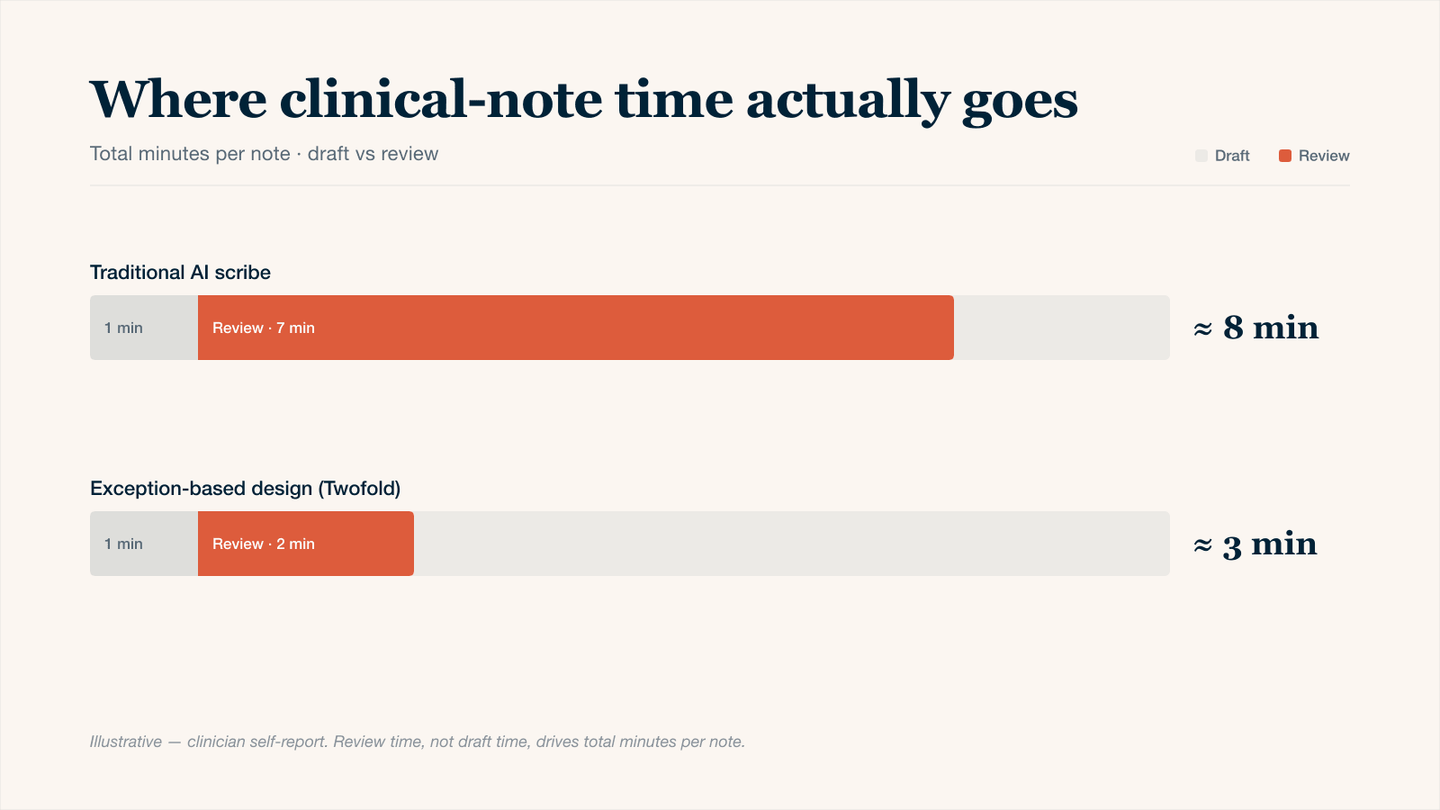
Where clinical-note time actually goes — review time, not drafting, is what eats clinician hours.
The Three Drivers of Review Burden
Driver | Why It Slows You Down | AI Fix Needed |
|---|---|---|
Hallucinated data | You must verify every lab value, medication dose, and date because AI occasionally invents plausible-sounding but incorrect details. | AI flags low-certainty claims, so you review only what's questionable. |
Over-narration | AI adds filler text, so you delete more than you keep. | Concise formatting with templates. |
Context blindness | AI treats each visit in isolation. You waste time re-entering what already exists. | Persistent memory across encounters; AI automatically pulls relevant data from the last 7 days (labs, referrals, patient messages) so you never review duplicate information. |
4 Strategies to Keep AI Clinical Notes Fast (Without Adding Work)
Implement these strategies in your review routine for a more efficient workflow with AI.
1. Batch Approve Notes
Not every note requires immediate, detailed review. Separate notes into high-stakes (new problems, complex patients, medication changes) and low-stakes (routine follow‑ups, normal labs, stable chronic disease). Review the high‑stakes notes immediately. Defer the low‑stakes notes to a batch session at the end of your day.
How It Works:
- AI automatically classifies each note as "high-stakes" or "low-stakes" based on keywords (e.g., "new diagnosis," "medication change," "abnormal lab")
- Low-stakes notes will be reviewed in bulk, going through each, approving or flagging.
- High-stakes notes are reviewed individually as they occur.
2. Reverse Review: AI Flags What Not to Read
Instead of you searching for errors, train the AI to explicitly tell you what it might have gotten wrong. This turns review into a checklist.
How It Works:
- After generating the note, AI produces a separate review list with 1–3 bullet points.
- Each bullet states a specific element the AI is uncertain about and why.
- You read only those bullets, make necessary changes, then approve the note.
3. Voice-Only Corrections (No Typing)
The review burden isn't just reading; it's clicking, deleting, and typing. Eliminate the keyboard by correcting notes with your voice.
How It Works:
- AI drafts the note.
- You speak corrections aloud: "Change 'three days' to 'five days' and delete the last sentence about nausea".
- AI applies the edit instantly.
- You never touch a mouse or keyboard.
4. Review by Exception: Only Abnormal Findings
Train your AI to only flag abnormal findings.
How It Works:
- Traditional AI note lists every normal result, you review everthing.
- Exception-based AI note writes only: "Abnormal findings: tenderness in right lower quadrant", you review one that line.
- Implementation: Set your AI template to include a section called "Only abnormal findings." The AI writes nothing for normal results. Spot-check 1–2 random notes daily to confirm accuracy.
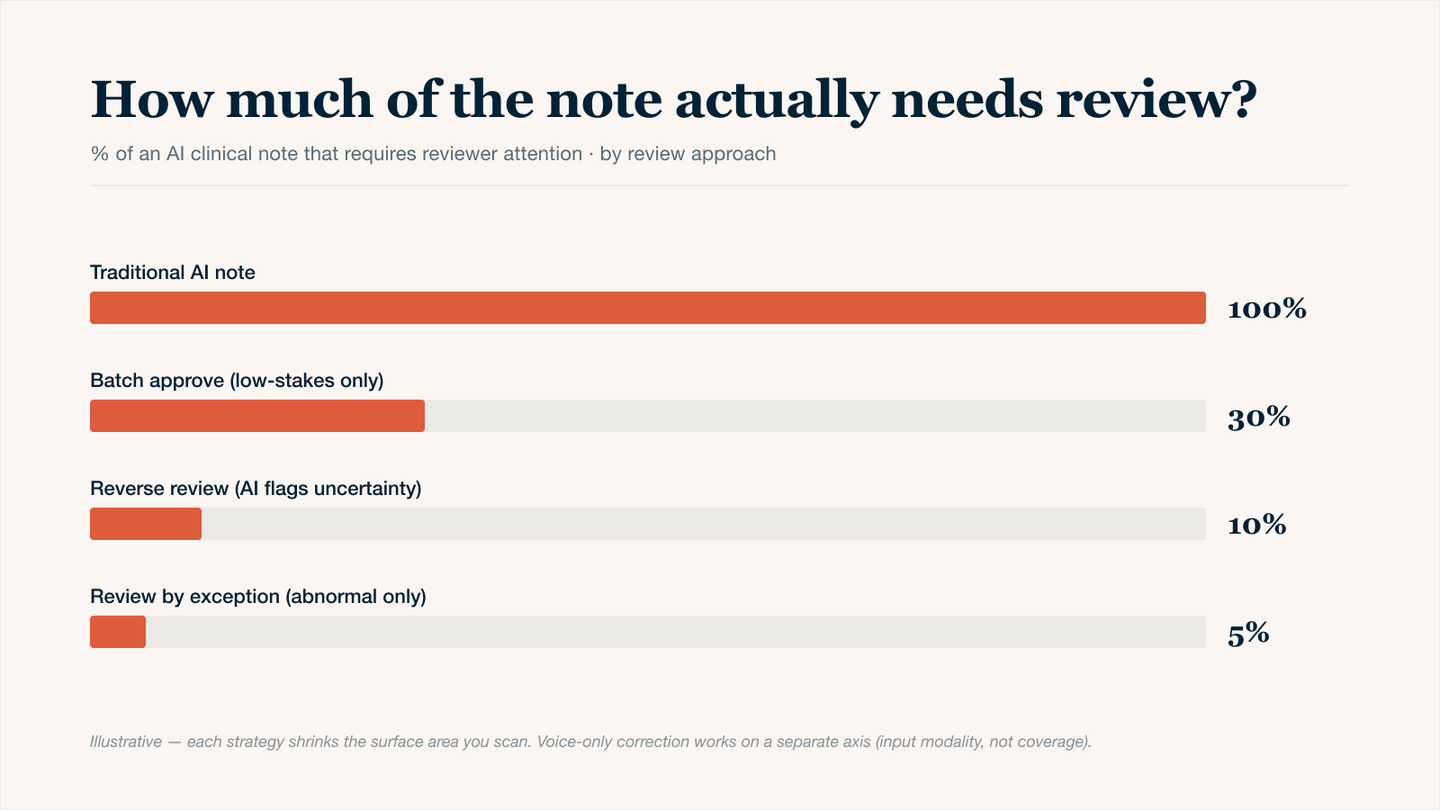
How much of the AI note actually needs review — each strategy reduces the cognitive surface area the clinician has to scan.
Conclusion
AI clinical notes don't have to feel like a second job. The secret is a smarter review design. By batching low‑stakes notes, letting the AI flag what not to read, correcting with your voice instead of typing, and reviewing only abnormal findings, you can cut review time by more than half. The ultimate goal is a workflow where you trust the routine, verify the uncertain, and never read a normal result again. Start with one strategy tomorrow, as your time belongs with your patients, not with proofreading.