


Your new AI scribe vendor promises "zero retention" for patient data. In healthcare, trusting marketing language over technical reality leads to breaches, fines, and lost patient trust. Vendors often use terms like minimum necessary and ephemeral processing as selling points, but not as legally binding commitments. For Covered entities evaluating HIPAA-compliant AI notes, good faith is not a compliance strategy; verification is. This article breaks down exactly how to evaluate those claims before you sign.
Decoding the Most Common (and Misleading) Vendor Claims
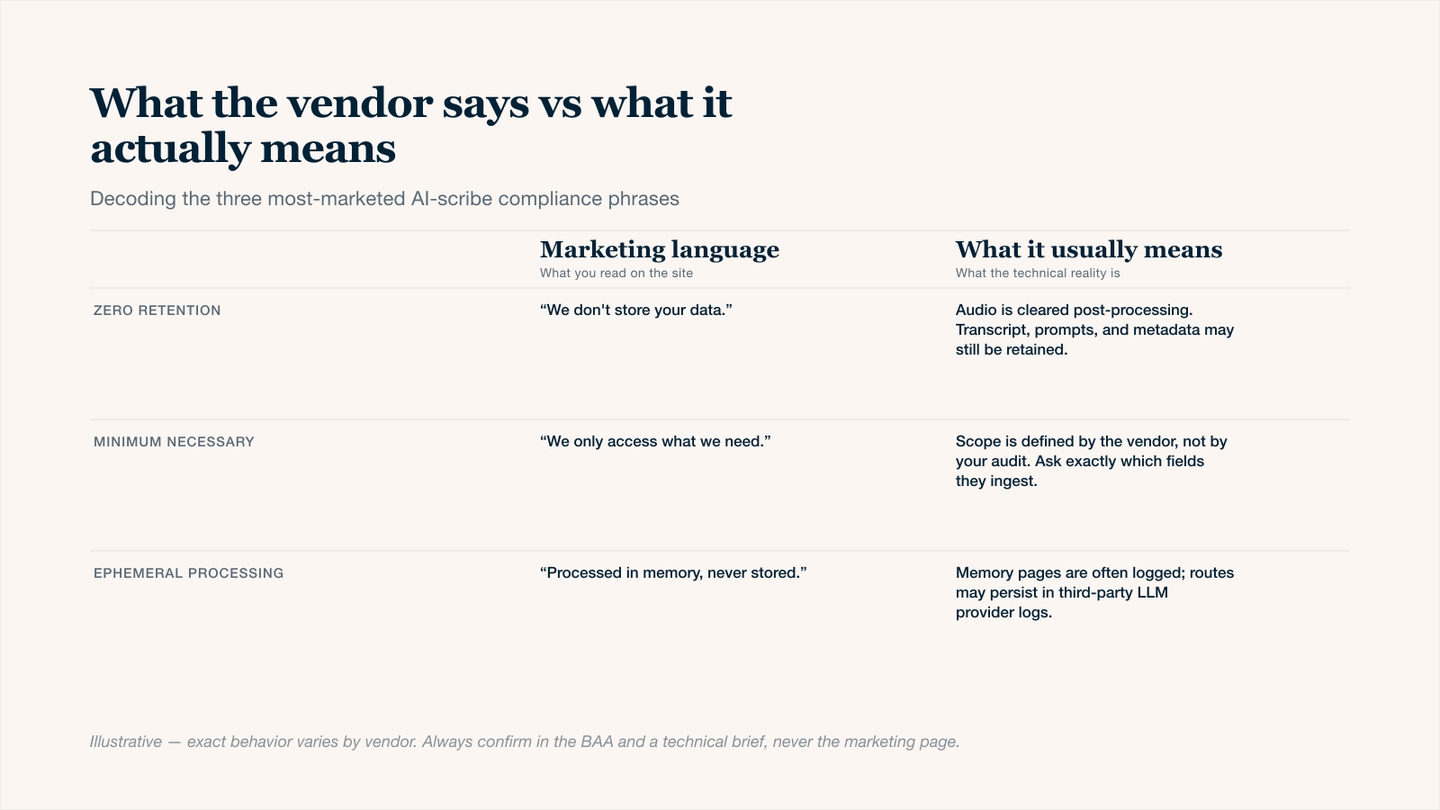
What the vendor says vs what it actually means — the gap that costs practices their BAA defense.
1. Zero-Retention
When a vendor promises zero retention, they want you to believe that patient data vanishes the moment processing completes. But here's what they often don't disclose: data may persist in logs, automated backups, or cache systems for 30 to 90 days.
- True zero-retention is rare and sometimes at odds with HIPAA, which requires certain designated record sets to be retained for legal minimum periods.
- The key question: Does the vendor delete after processing, or do they never write to disk in the first place? Only the latter qualifies as true zero-retention.
2. Minimum Necessary Standard
HIPAA's minimum necessary rule requires that uses and disclosures of Protected Health Information (PHI) be limited to the minimum needed for the intended purpose.
But some vendors request full access to patient notes "just in case" the AI needs context. That's a violation of the intention of the rule.
Red flags to watch out for:
- Refusal to offer role-based access controls (RBAC).
- No field-level redaction capabilities.
- Support staff who can view full patient notes.
3. Ephemeral Processing.
Ephemeral processing sounds secure; data exists only in memory, temporarily. But even RAM‑based storage can be captured during a memory dump or system snapshot.
- Verification Requirement: Ask for their memory sanitization validation (e.g., FIPS 140-3 level evidence) and confirmation that no swap files or crash dumps persist PHI.
A 5-Step Verification Framework to Protect Patient Data
Use this numbered checklist to vet any vendor making HIPAA‑related claims:
- Request the Data Flow Diagram (DFD): A technical DFD shows every single step PHI takes from intake to deletion.
- Review the Business Associate Agreement (BAA): Look specifically for sub-processors, error logging clauses, and automated backup retention. These are where data hides.
- Test the Deletion API: Send test PHI, request deletion, and demand a certificate of destruction. If they can't provide one within 30 days, they don't have true deletion.
- Review their SOC 2 Type II: Type II shows operational effectiveness over 6-12 months. Always require Type II.
- Test the "Minimum Necessary" Controls: Ask a simple question:
- Can a support administrator see full patient notes? If yes, their minimum necessary claim fails.
How to Spot HIPAA-Compliant Vendors Before You Sign
Vendor Claim | What You Want to See (Proof) |
|---|---|
Zero-retention | Written policy excluding logs/backups + automated deletion audit trail |
Minimum Necessary | Field-level tokenization + configurable data masking UI |
Ephemeral | RAM overwrite/sanitize ephemeral storage confirmation |
Audit Logs Available | Real-time access to who viewed what PHI |
The Role of HIPAA-Compliant AI Notes in The Healthcare Industry
True compliance for AI note‑taking requires specific safeguards beyond traditional software:
What To Specifically Verify for AI Notes:
- Is the large language model (LLM) optimized on zero patient data?
- Are prompts and responses excluded from model training by default?
- Does the vendor offer on-premises or virtual private cloud setup for complete control?
When evaluating HIPAA‑compliant AI notes, treat the AI model itself as a potential retention risk.
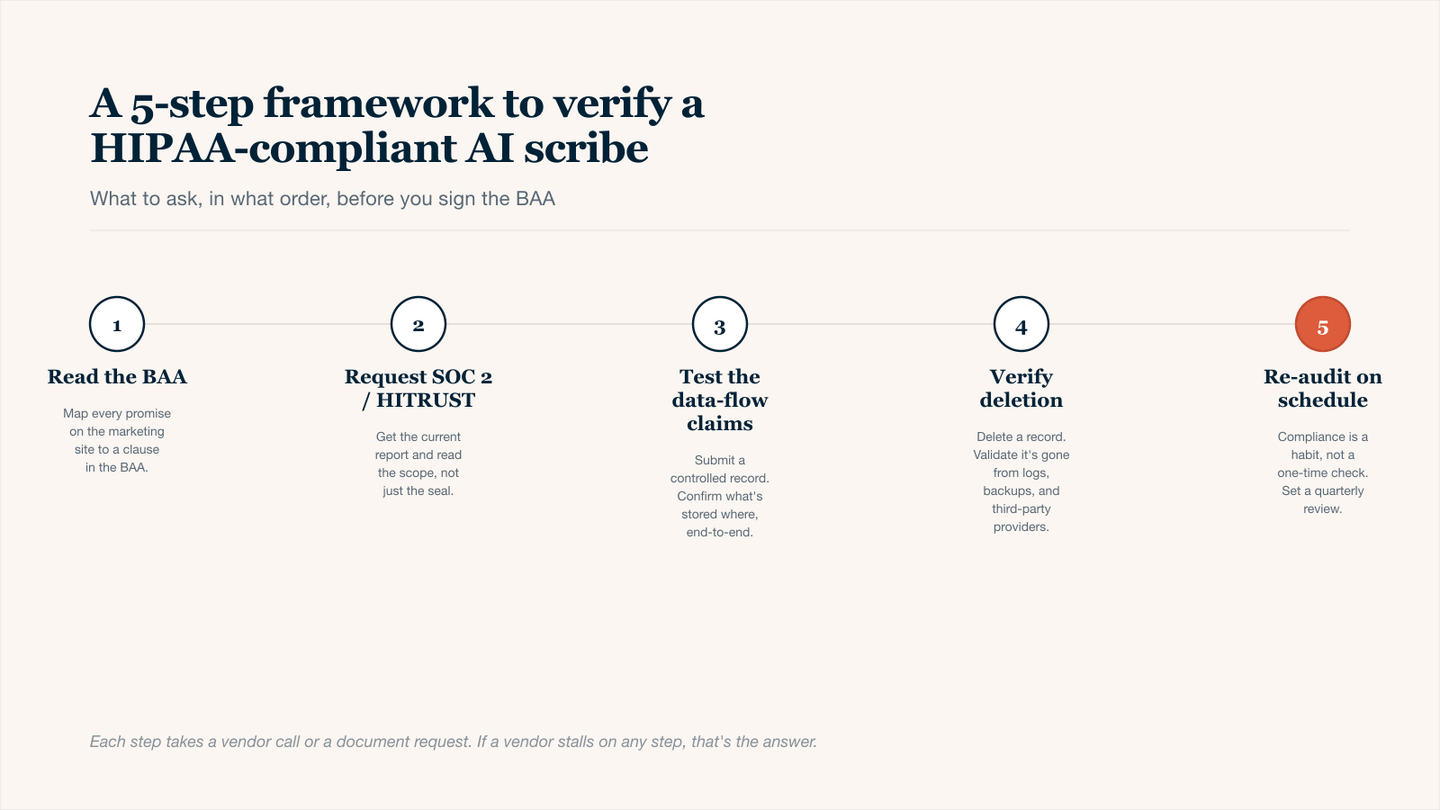
Five steps, in this order — what to verify before you sign the BAA with any AI clinical-notes vendor.
Conclusion
Vendors' claims sound reassuring, but compliance always requires verification. Demand data flow diagrams, audit BAAs for hidden log retention, and test deletion APIs yourself. A SOC 2 Type II report matters. Remember: if a vendor can't show you how they delete data, then they probably aren't deleting it. In healthcare, trust must always be earned and verified.