



You want less charting, but should you buy an AI medical scribe or an EHR overlay? Most clinicians don't realize these tools solve completely different problems.
An AI medical scribe for clinicians listens to your patient conversation and writes the note for you. An EHR overlay helps you click existing forms faster. If you choose the one that's not right for your workflow, you'll still end up leaving the clinic two hours late. This guide compares speed, workflow fit, and accuracy across both solutions. By the end, you'll know exactly which tool, or combination, belongs in your clinic.
What Is an AI Scribe and What Does It Actually Do?
An AI medical scribe is an ambient listening technology that generates complete clinical notes from natural conversation, without any typing, clicking, or templated forms during the patient visit.
How an AI Scribe Works in Three Simple Steps
- Capture: A microphone (phone, laptop, or exam room device) records the patient-clinician conversation.
- Process: AI models transcribe speech, identify medical concepts, and structure the narrative.
- Output: A draft SOAP note (HPI, ROS, MDM, A/P) appears within seconds of visit end.
Key Features That Define a True AI Scribe
- No Templates During The Visit: You focus on the patient, not clicking boxes.
- Captures Patient Narrative Naturally: The AI follows conversation flow, including interruptions and topic shifts.
- Medical Decision-Making Extraction: Identifies differential diagnoses, rationale for tests, and treatment plans.
- EHR Integration: Outputs directly via API, or copy/paste in seconds.
What Is an EHR Overlay and How Is It Different?
An EHR overlay is a UI layer, browser extension, or macro tool that sits on top of your existing electronic health record to streamline structured data entry. It does not listen, write, or think; it helps you click and type faster.
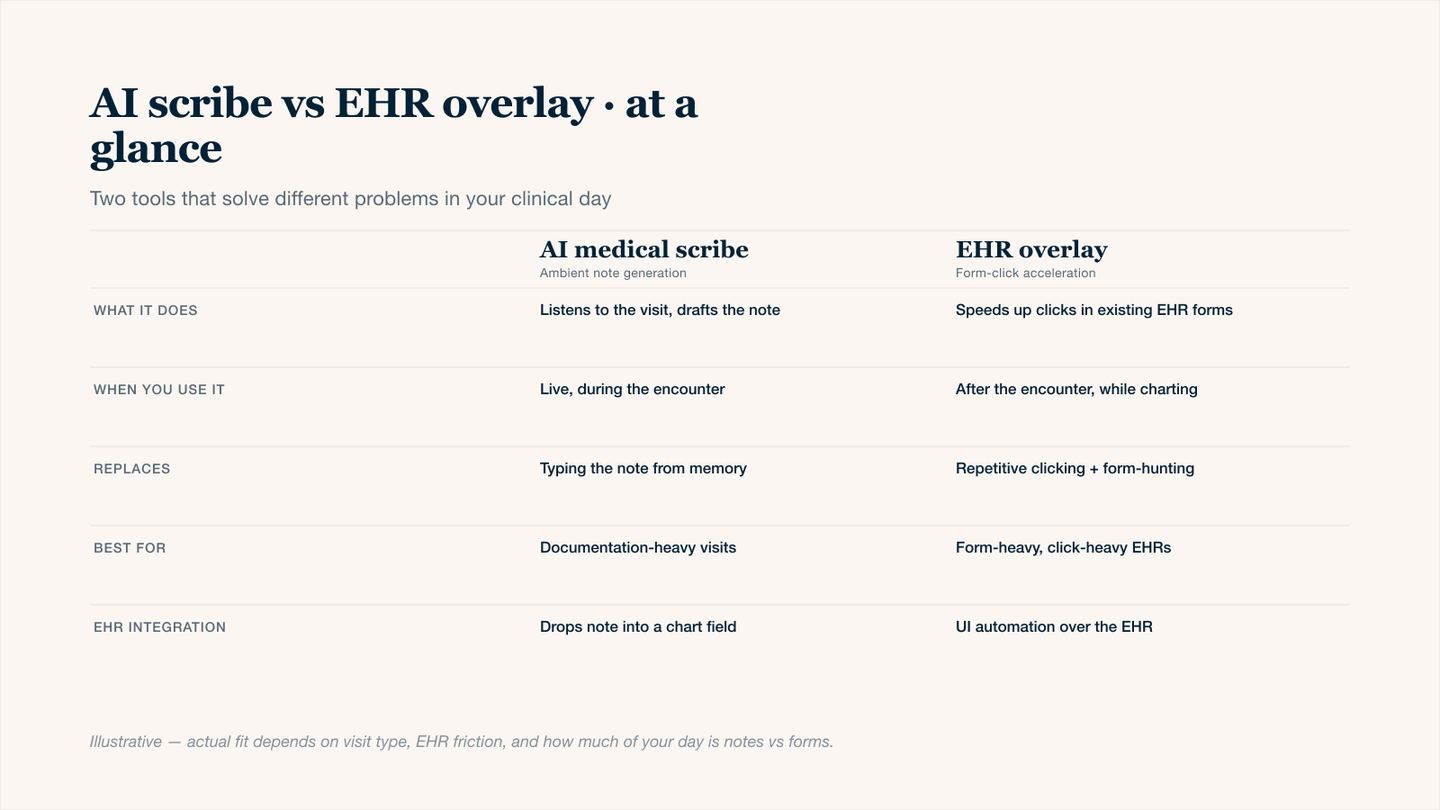
AI scribe vs EHR overlay — same goal (less time on documentation), opposite mechanisms.
How an EHR Overlay Works
Instead of navigating native EHR dropdowns and tabs manually, an overlay provides:
- Smart Forms: One-click checkboxes for common ROS or physical exam findings.
- Voice-to-Text Macros: Say "normal ROS," and a paragraph populates.
- Auto-Populated Fields: Pulls forward problem lists, medications, or last visit data.
- Custom Scripts: Power users program keyboard shortcuts for repetitive note sections.
The Critical Difference
An overlay does NOT listen to conversations.
- AI Scribe: Listens to the patient and writes the story.
- EHR Overlay: Listens to you (if voice-enabled) or your keystrokes, but never the patient's narrative.
AI Scribe vs EHR Overlay: Key Differences
Understanding the core differences prevents a mistake: buying the wrong tool for your workflow.
Feature | AI Scribe | EHR Overlay |
|---|---|---|
Input method | Ambient listening | Keyboard, mouse, voice commands |
Primary output | Narrative SOAP and HPI | Form fields (checkboxes, dropdowns) |
During a patient visit | Hands-free, eyes on patient | Still requires screen interaction |
Best for | Clinic notes, consults, follow-ups | High-volume structured data entry |
Documentation style | Patient-led narrative | Clinician-led template filling |
AI Scribe vs EHR Overlay: Where They Fall Short
Understanding limitations will help you choose wisely.
AI Scribe Limitations and How to Mitigate Them
Limitation | Why it Happens | Mitigation |
|---|---|---|
Struggles with heavy accents or overlapping speech | AI models trained on standard English dialogue | Review and edit drafts |
Cannot reliably capture physical exam maneuvers without prompting | The AI doesn't know what you're doing with your hands | Verbally narrate exam findings |
Might miss subtle non-verbal cues | No visual input | Verbally summarize what you observe |
EHR Overlay Limitations
Limitation | Why It's a Problem |
|---|---|
Still requires you to translate conversations into clicks mentally | Cognitive load remains high, you cant fully focus on the patient |
No ambient capture | If you dont dictate or click it, it never appears in the chart |
Encourages note bloat | Macros paste long text that makes it hard to find relevant details |
When to Choose an AI Scribe
The best scenarios for an AI scribe:
- Outpatient primary care or specialty (dermatology, orthopedics, psychiatry, neurology).
- You want to maintain eye contact during the entire visit.
- Your notes are narrative-heavy.
- You see 15+ patients per day.
- You train residents or students.
When to Choose an EHR Overlay
Best scenarios for an EHR overlay:
- Procedure-heavy clinics (colonoscopy, joint injections, pain management)
- Your EHR is an older model (on-premise, no API, no modern integration)
- You need macros for repetitive physical exams.
- You primarily use dictation already (Dragon, Nuance), overlay adds template navigation to your existing voice workflow
When to Use Both: The Hybrid Approach to AI Scribe and EHR Overlay
The most efficient clinical workflows combine an AI scribe for narrative and an EHR overlay for structured data. Together, they eliminate typing and clicking.
The Hybrid Workflow in Four Steps
Step | Action | Tool Used |
|---|---|---|
Pre-chart | Pull forward the problem list and medications | EHR Overlay |
During visit | Listen to patient, draft HPI + MDM | AI Scribe |
Physical exam | Verbally narrate findings | AI Scribe |
Post-visit | Add billing codes and checkboxes | EHR Overlay |
EHR Compatibility: How AI Scribes and EHR Overlays Integrate Differently
Understanding integration methods is key to a seamless launch.
AI Scribe Integration Methods
AI scribes are designed to be EHR‑agnostic. They work with almost any system because they don't need deep access.
Common Integration Approaches:
- Copy/paste Workflow: AI generates a note; you paste it into any EHR field. Works with every modern EHR.
- API Direct Push: One click sends the note into your EHR's note editor.
- FHIR-based Integration: Structured data (problems, meds, allergies) can be mapped to discrete fields. Still emerging for most AI scribes.
- Browser Extension: Some AI scribes offer Chrome extensions that auto-populate note fields.
EHR Overlay Integration Methods
EHR overlays are EHR‑dependent by design. They sit on top of your existing UI.
Common Integration Approaches:
- Browser Extension: Runs in Chrome, Edge, or Firefox. Adds buttons, auto-fills fields, or triggers macros. Most common method.
- Native EHR Scripting: Built into the EHR itself (e.g., Epic SmartPhrases, .lts scripts).
- Desktop Overlay: Runs as a separate window that listens for keystrokes or clipboard events. Works with any app.
AI Scribe vs EHR Overlay: HIPAA, Privacy, and Compliance Considerations for Each
Both tools must comply with HIPAA. But how they comply is different.
AI Scribe: Key Compliance Considerations
AI scribes introduce two primary risk areas: audio capture and cloud processing.
What Happens To The Audio?
- The microphone captures the entire patient conversation (PHI in audio form).
- Audio is transmitted to cloud AI servers for transcription.
- Once transcribed, audio is encrypted and deleted (varies by vendor).
- Text notes are retained per your normal EHR retention schedule.
Required Safeguards:
- BAA (Business Associate Agreement): Vendor must sign one. Never use an AI scribe without it.
- Encryption in Transit and at Rest: TLS 1.3 for transmission; AES-256 for stored data.
- Audit Logs: Who accessed what audio/text and when.
EHR Overlay: Key Compliance Considerations
EHR overlays introduce different risks: UI manipulation and broad EHR access.
What The Overlay Sees And Does:
- A browser extension or script reads everything displayed in your EHR.
- Can see patient names, diagnoses, full notes, and billing data.
- Can modify fields, insert text, or delete content depending on permissions.
Required Safeguards:
- BAA Required: Overlay vendors handle PHI if they read or write to your EHR.
- Least Privilege Access: Overlay should only access the fields it needs, not your entire EHR.
- Session Logging: Every field read or written should be logged.
- No Persistent Storage: Overlays should not store PHI locally on the clinician's device.
AI Scribe Costs vs EHR Overlay Costs: What to Expect
Cost Factor | AI Scribe | EHR Overlay |
|---|---|---|
Typical Pricing Model | Per provider/month | Per user/ month or a one-time licence |
Monthly cost per provider | $49-400 | $75-99 |
Free trial available | Yes | Sometimes |
Training time | 1-2 hours | 2+ hours (building/testing macros) |
IT implementation cost | None | Low to moderate |
Cancellation fee | None | None |
Eliminate Charting Burden with Twofold's AI Scribe
Twofold is an ambient AI medical scribe built for clinicians who want to reclaim their evenings and refocus on patients.
- Ambient Listening: Twofold listens to your natural patient conversation and drafts a complete SOAP note (HPI, ROS, MDM, A/P) within seconds.
- Works with any EHR: Twofold outputs notes via copy/paste. There are no extra browser extensions, and no IT approval waitlist. You can go live in under 10 minutes.
- Specialty-trained for Accuracy: Unlike generic AI tools, Twofold's models are trained on clinical dialogue across primary care and specialties (dermatology, orthopedics, psychiatry, and more).
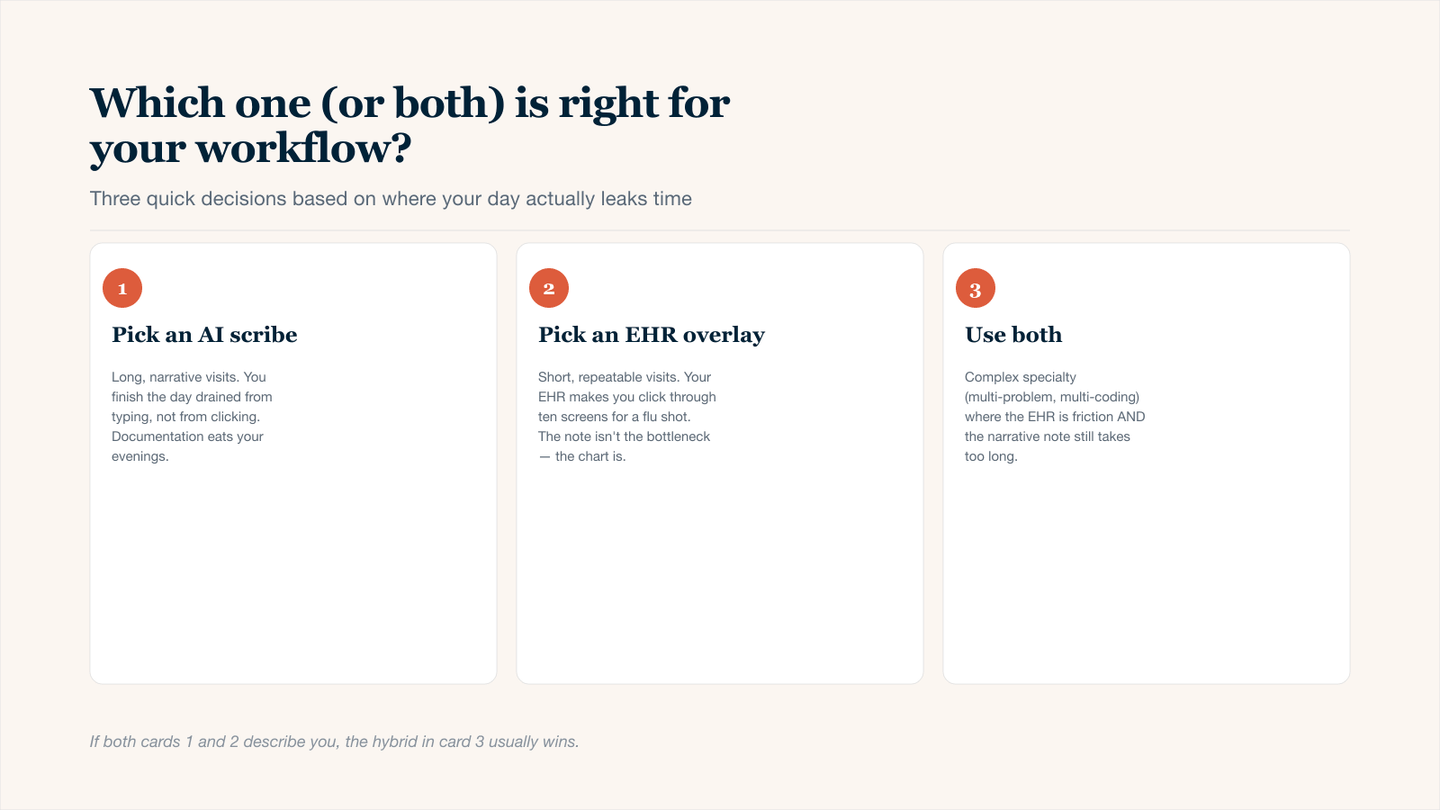
Three-card decision guide — which tool fits the way your clinical day actually leaks time.
Conclusion
AI scribes and EHR overlays ultimately solve different problems. An AI scribe listens and writes, eliminating after‑hours charting and restoring eye contact with patients. An EHR overlay autofills forms, making structured data entry faster, but leaving your cognitive load unchanged. Choose an AI scribe if you want to stop typing and start listening. Choose an EHR overlay if you only need to click boxes faster. The best option is to choose both if you want complete hands‑free documentation and an efficient clinical workflow.