


To write a SOAP note from a live session, pick the SOAP template in Twofold, press Capture Conversation, and run your session. When you press End, Twofold writes the Subjective, Objective, Assessment and Plan sections. You review the draft, edit it, and paste it into your EHR.
What a SOAP note is
A SOAP note is a clinical note in four parts. Subjective is what the patient tells you. Objective is what you observe or measure. Assessment is your clinical judgment. Plan is what happens next.
Twofold is an AI scribe for therapy and clinical notes. It listens to the session and sorts what was said into those four parts.
What changes when Twofold drafts the note
Most SOAP notes get written hours after the session, from memory. Details drop out. The Plan gets vague. Here is what is different when the draft comes from the session itself.
Writing it by hand | With Twofold | |
|---|---|---|
When it is written | After the session, often hours later | Drafted when you press End |
What it is based on | Your memory and quick jottings | The conversation itself |
During the session | Attention split between the patient and your notes | Attention on the patient |
Your work afterward | Typing all four sections | Reviewing and editing a draft |
Into the chart | Typed into the EHR | Copied and pasted |
Mental health SOAP note example
This is the note you will end up with in the walkthrough below, after the edit in step 7. It is a follow‑up session for anxiety and poor sleep.
- Subjective
- Reports poor sleep for three weeks and racing thoughts at night since the job change.
- Objective
- Alert and oriented. Speech at normal rate. Mood anxious, affect congruent.
- Assessment
- Generalized anxiety with sleep disturbance, worsening over the past month.
- Plan
- Continue weekly CBT. Start a sleep diary. Review progress next session.
Watch the full walkthrough
All 8 steps in one video. 59 seconds, no sound.
Video transcript
Before you start
- A Twofold account, open on the device you will have in the room.
- A working microphone. The built-in one is fine if the device sits close to the conversation.
- Your patient's agreement to use a scribe, following your own consent process.
The walkthrough below uses a demo patient, Adam R. He is not a real person.
How to write the SOAP note: 8 steps
The steps below show the flow in the product, one click at a time. Jump to any step:
1. Start a new session
Click the Name field and type the patient's name. In the demo it is “Adam R.”
2. Pick the SOAP template
Open the Template menu and choose SOAP (Mental Health). The menu in the demo also lists SOAP, Progress (Mental Health) and Intake (Mental Health).
This choice matters more than it looks. The template tells Twofold how to organize what it hears. Pick SOAP and you get Subjective, Objective, Assessment and Plan, in that order. You can browse other formats in the template library.
3. Set the session type
Check that the Session field shows In person. If you are on a video call, change it here before you record.
4. Press Capture Conversation
Click Capture Conversation. The screen changes to “Listening” and a timer starts. The patient shows as “Recording...” in the sidebar.
5. Run your session as usual
Talk with your patient. Keep the device close to the conversation. You do not need to dictate or speak in note language.
If something should stay off the record, use the pause button next to the timer.
6. Press End
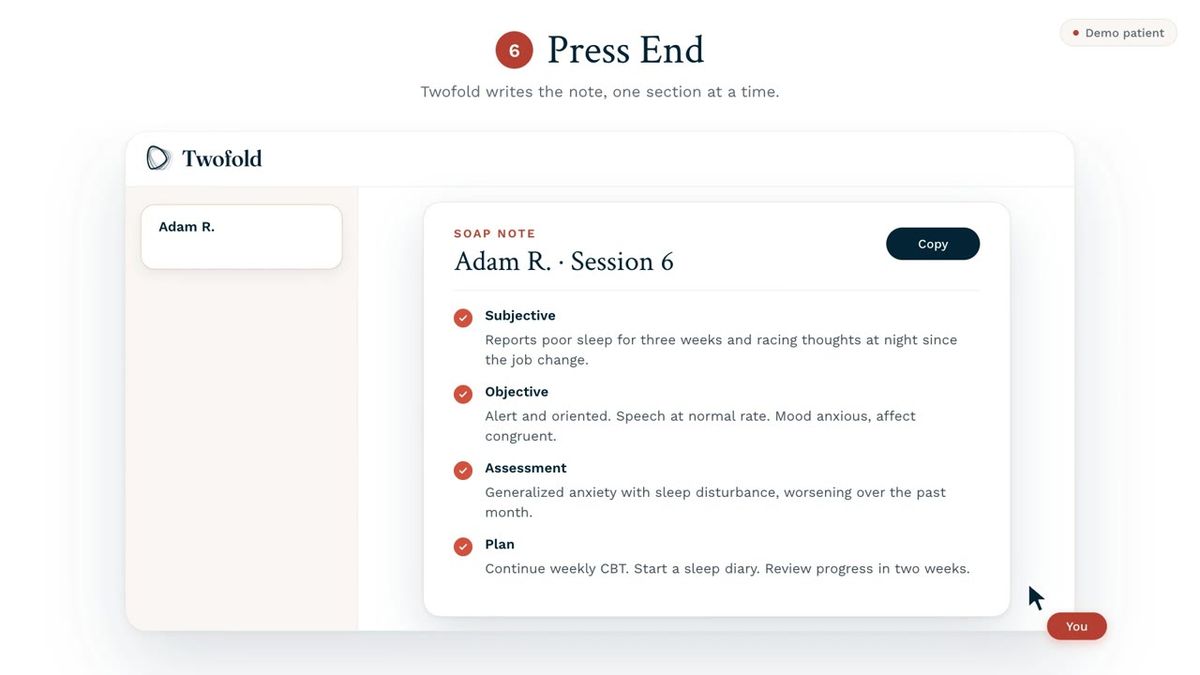
Click END when the session is over. Twofold writes the note one section at a time: Subjective first, then Objective, Assessment and Plan. Each section gets a check mark when it is done.
7. Review and edit the note
Read the note from top to bottom. To change something, select the words and type over them.
In the demo, the Plan says “Review progress in two weeks.” The clinician selects “in two weeks” and types “next session.”
This step is not optional. Twofold drafts the note. You are the clinician, and the note is yours once you sign it.
What to check before you sign
A draft written from a conversation fails in predictable places. Check these four.
Section | What it holds | What to check |
|---|---|---|
Subjective | What the patient reported | Is the time frame right? “Three weeks” and “three months” sound alike. |
Objective | What you observed | A scribe hears the session. It does not see it. Add what you noticed that nobody said aloud. |
Assessment | Your clinical judgment | Change any wording you would not stand behind. |
Plan | Next steps | Are the actions and dates exactly what you agreed with the patient? |
8. Copy it into your EHR
Click Copy. The button changes to “Copied.” Open the patient's chart in your EHR and paste.
Because the note travels by copy and paste, you do not need an integration. It works with any EHR.
The same flow works for other notes
Nothing in these steps is specific to SOAP. The Template menu in step 2 also lists Progress (Mental Health) and Intake (Mental Health). Choose one of those and the rest of the flow stays the same: capture, End, review, copy.