


We work with EHR and platform teams adding documentation at Twofold, and the conversation almost always lands on the same fork: do we build the AI scribe ourselves, or partner for it? This guide lays out both paths honestly — what each one actually costs, how the integration works, and how to decide.
Transcription is the easy part. The hard, ongoing part is turning a conversation into a defensible clinical note and getting it safely into the chart. That's the work this article is really about.
The two paths: build vs. partner
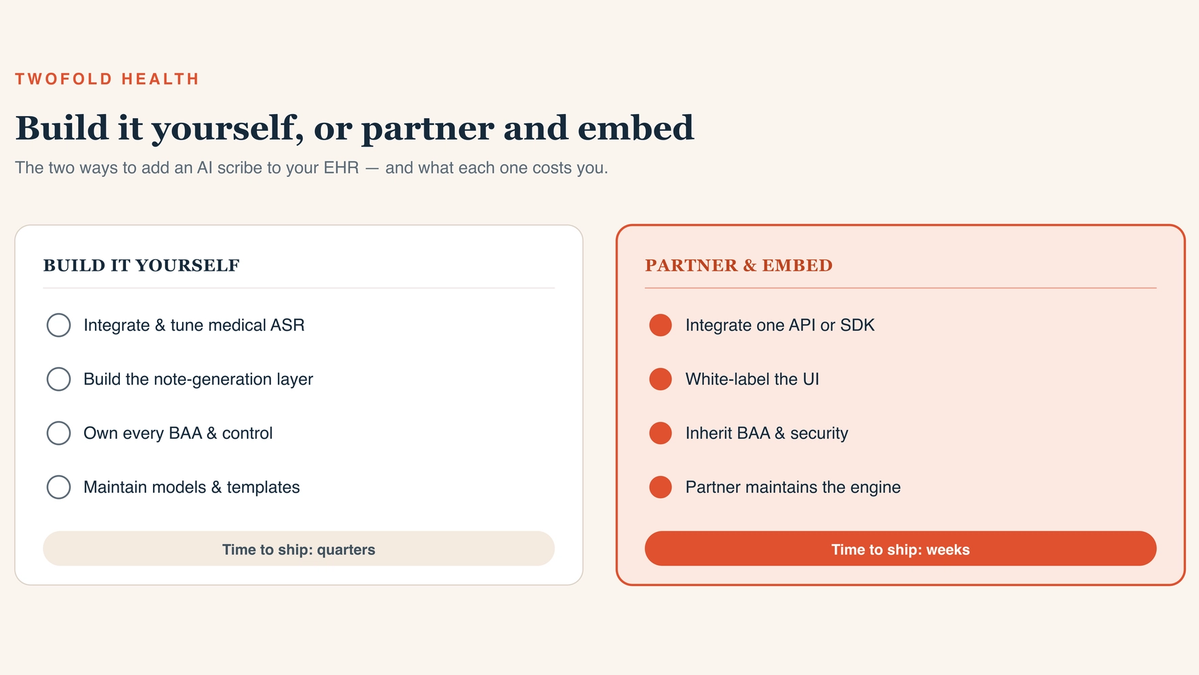
The hero image above frames the choice. Building means you own the documentation engine end to end. Partnering means you integrate a finished‑note engine and focus your effort on the EHR‑side experience. Both are legitimate — they just suit different products.
Build it yourself
You integrate (or train) medical ASR, build the note‑generation layer — summarization, specialty templates, safety guardrails — own the BAA chain, and maintain models and templates as clinical language drifts. You get maximum control at the cost of a multi‑year, multi‑discipline investment.
Partner and embed
You integrate one API or SDK that returns a finished note, white‑label the experience, and inherit the vendor's BAA and security posture. Your engineering shrinks to capture, a review UI, and write‑back. You trade some control for a feature you can ship in weeks.
The integration architecture
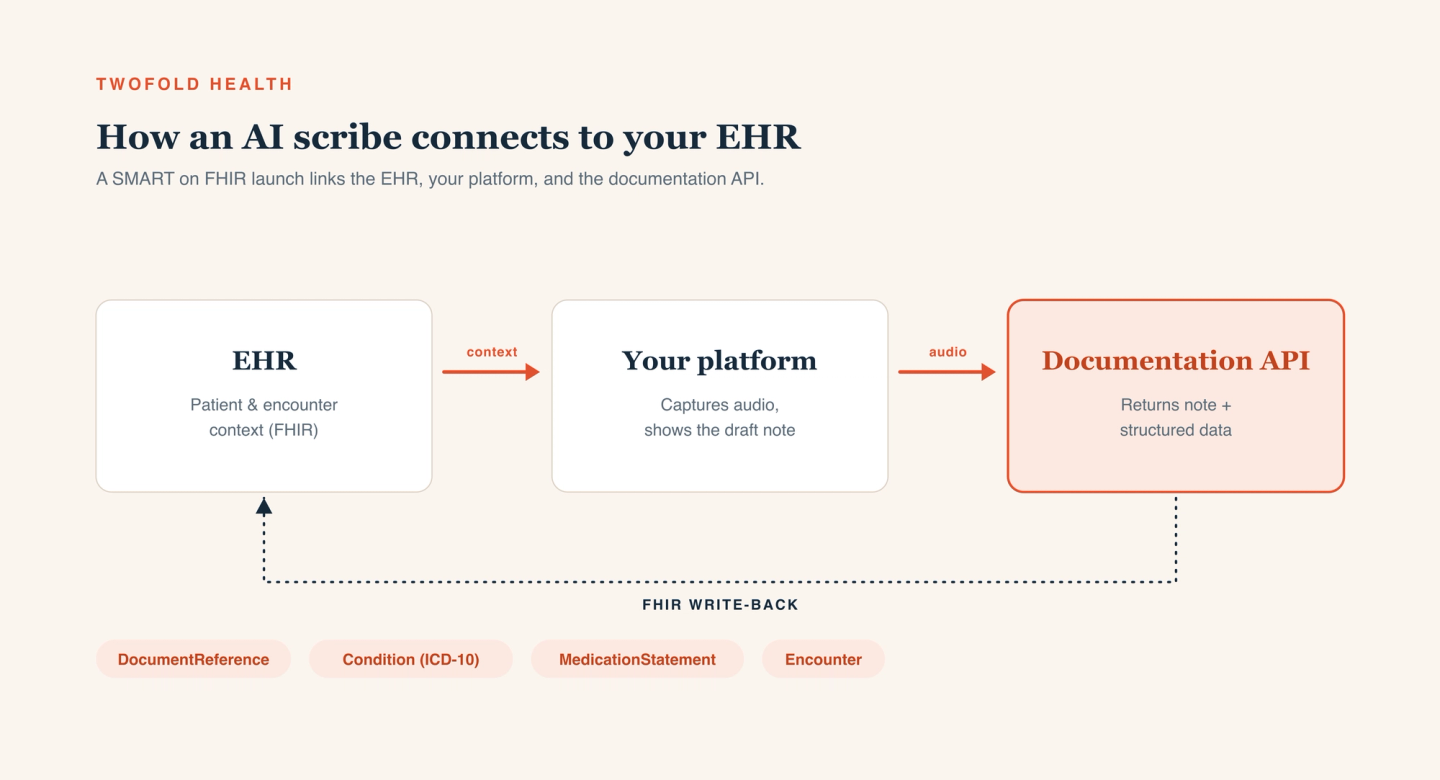
However you source the engine, the EHR‑side architecture is similar. The diagram below shows the shape: your EHR holds patient and encounter context, your platform captures audio and shows the draft note, and a documentation API returns the note plus structured data — which you write back to the chart.
Launch in context with SMART on FHIR
Launch the scribe as a SMART on FHIR app inside the patient and encounter context. That single step gives the documentation engine the grounding it needs — who the patient is, what the encounter is — and keeps the clinician in one workflow instead of juggling tabs.
Read context, then capture audio
Pull relevant context (problems, medications, recent encounters) via FHIR so the note is grounded in the chart, then capture or stream the encounter audio from your client with consent and metadata attached.
Return a note, review, then write back
The engine returns a structured note and data. Render it for clinician review, let the human edit and sign, and only then write back to the chart — typically as FHIR resources like DocumentReference (the note), Condition (problems), MedicationStatement (medications), and Encounter.
What you build either way
Even with a partner handling the note engine, the EHR side is yours to build and own. Budget for it:
- Audio capture that's reliable on real networks — buffer locally, normalize sample rates, attach encounter metadata.
- A clinician review UI that shows the draft note (ideally beside its source) and makes signing fast and deliberate.
- FHIR write-back that maps the note and structured data to the right resources and handles failures gracefully.
- Audit trails linking the final note to the audio and transcript it came from.
Keeping a clinician in the loop
The most important design decision is that a human signs the note. A generated note is a draft until a licensed clinician takes accountability for it. Render the draft clearly, make low‑confidence sections obvious, never auto‑finalize, and write back to the chart only after the clinician signs. Capture edits — the diff between draft and signed note is the most honest signal of where the engine falls short.
HIPAA, PHI, and your BAA
Every component that touches audio, a transcript, or a note is in scope for PHI — the documentation engine, your hosting, your logging, even analytics. Sign a BAA with each, encrypt in transit and at rest, enforce least‑privilege access, and log access end to end. Pin down retention and training terms in writing. Our take on the security posture this requires is on our security page.
A pragmatic recommendation
If a clinical scribe is your core differentiator and you'll fund it for years, building gives you maximum control. For most EHRs and platforms, though, the scribe is a feature users expect — and the note‑generation layer is a large, ongoing investment that isn't your core product. In that case, partnering ships the feature in weeks and keeps the clinical layer maintained for you.
That's the gap our partner program is built to fill — a white‑label scribe you embed in your EHR — and the same engine is available as a medical speech-to-text and documentation API if you'd rather build the surface yourself.