


We build a clinical documentation API at Twofold, and the question we hear most from engineering teams is some version of: 'Can't we just call a speech-to-text API and get a note?' The honest answer is that transcription is the easy 20% — the note is the other 80%. This guide lays out the architecture we'd recommend whether you build that 80% yourself or buy it.
We'll walk the pipeline end to end, show exactly which layers sit on top of raw transcription, and give you a pragmatic build‑vs‑buy recommendation. No accuracy claims you can't verify, and no pretending the build is smaller than it is.
Start with one question: transcript or note?
Everything downstream depends on this. If your product only needs to store or search what was said, a transcript is enough and you should buy the cheapest medical‑tuned ASR that clears your accuracy and HIPAA bar. If your product needs to display, store, or bill from a clinical note, you're committing to build (or buy) a documentation layer. Most teams asking this question actually need a note — they just haven't priced the layer yet.
The four stages of a documentation pipeline
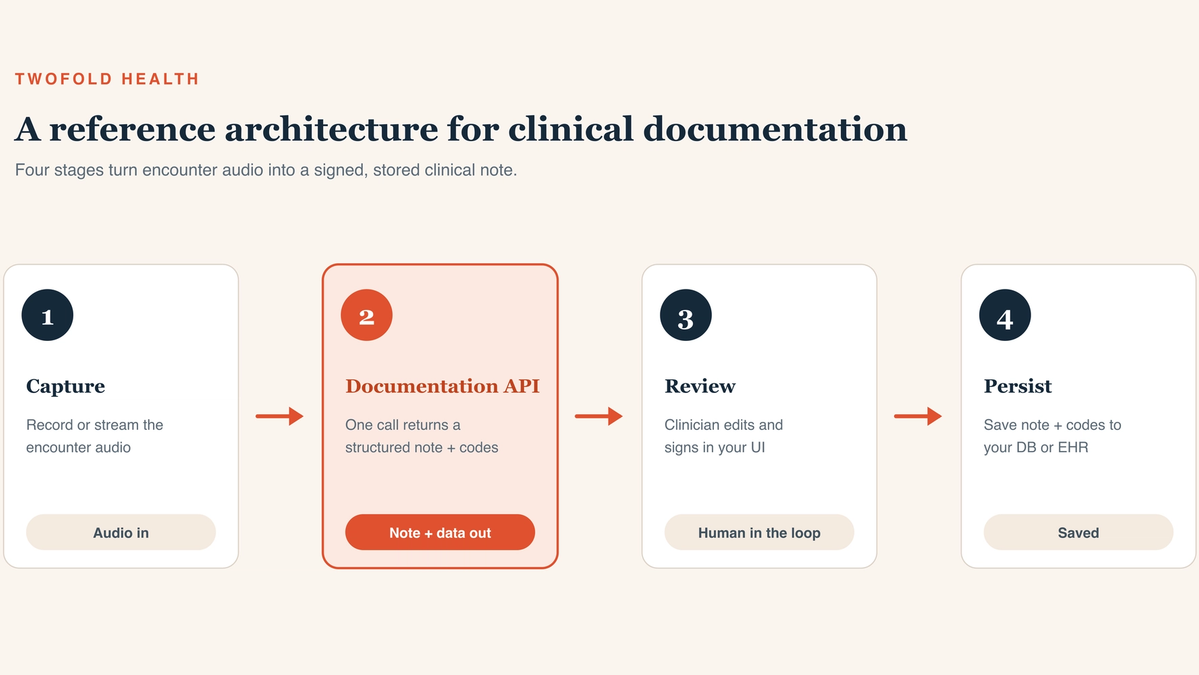
The hero diagram above shows the shape: capture, generate, review, persist. Here's what each stage is responsible for.
1. Capture
Record or stream the encounter audio from your client. Decide early between streaming (live, lower latency, more complexity) and pre‑recorded/batch (simpler, fine for asynchronous workflows). Capture consent and metadata — clinician, patient, encounter type — because your note layer and your compliance posture both need it.
2. Generate
Turn audio into a clinical note. With raw ASR this is where most of your engineering lives (see the next section). With a documentation API, a single call returns a structured, specialty‑aware note plus data — the generation layer is the product.
3. Review
A licensed clinician edits and signs. This stage is non‑negotiable: a generated note is a draft until a human takes accountability for it. Design the UI so the draft sits next to its source transcript and edits are quick.
4. Persist
Store the signed note and any structured data (problems, medications, ICD‑10/CPT codes) in your database or push it to the EHR. Keep an audit trail linking the final note to the audio and transcript it came from.
What you build on top of raw transcription
If you take the raw‑ASR path, this is the work that stands between a transcript and a note. The diagram below stacks it: the bottom two layers are what ASR gives you, and the top five are what you'd build and maintain.
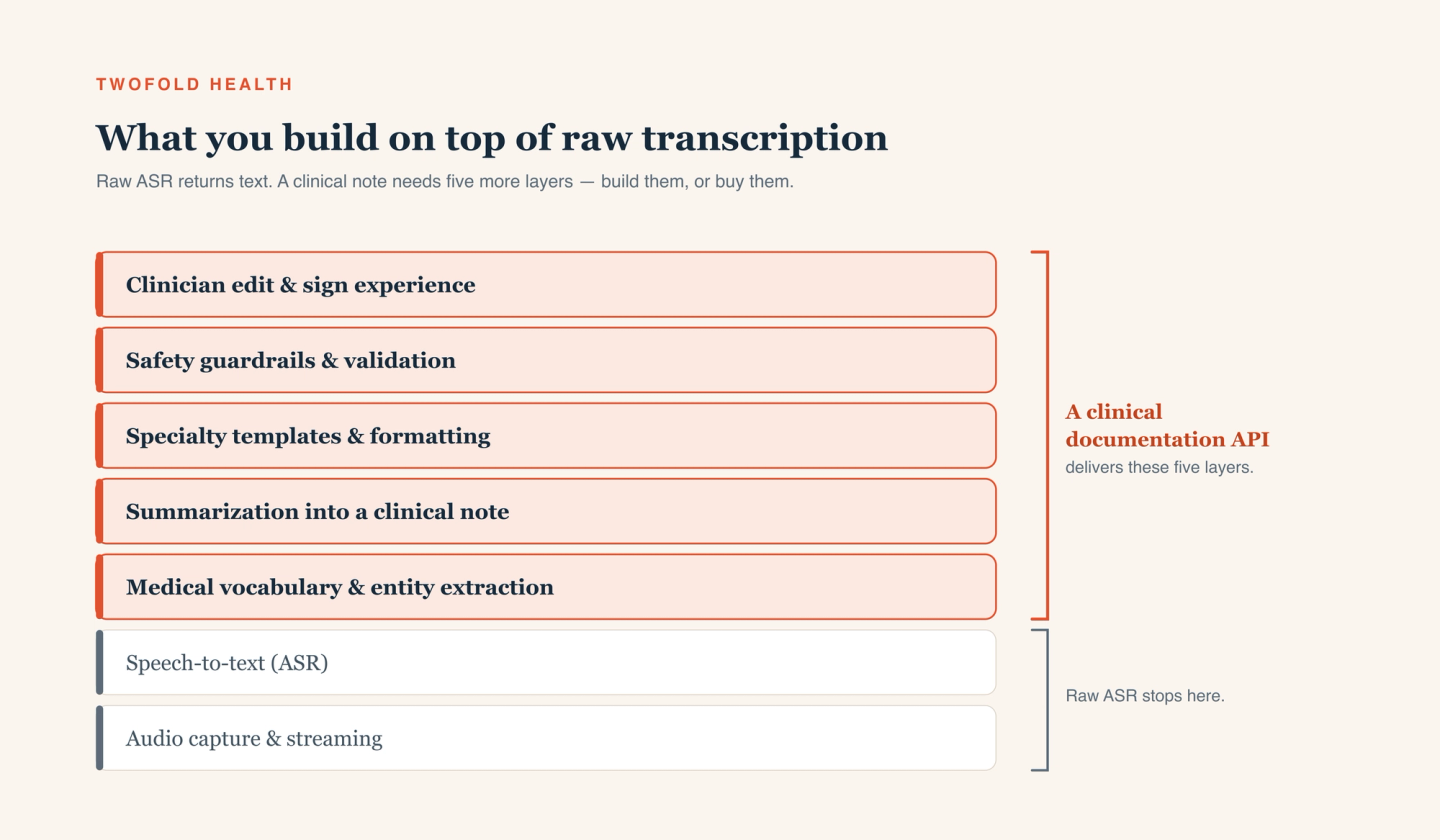
- Medical vocabulary & entity extraction — pull out medications, dosages, problems, and labs reliably enough to structure and code.
- Summarization into a clinical note — convert a noisy, non-linear conversation into a coherent, specialty-appropriate narrative.
- Specialty templates & formatting — SOAP, intake, psychotherapy notes, and the formatting each specialty expects.
- Safety guardrails & validation — prevent fabricated findings, flag low-confidence sections, and keep the model from asserting things the audio didn't support.
- Clinician edit & sign experience — a fast review UI, plus evaluation and prompt/model maintenance that never really ends.
None of these are one‑time tasks. Clinical language, your specialties, and model behavior all drift, so each layer is an ongoing investment — which is exactly why this is a build‑vs‑buy decision rather than a weekend project.
Designing the capture layer
Keep capture thin and reliable. Stream when clinicians need the note moments after the visit; use batch when a short delay is fine — it's simpler and easier to retry. Either way, buffer locally so a flaky network doesn't lose audio, normalize sample rates before upload, and attach encounter metadata at capture time so the note layer has the context it needs.
Choosing your API tier
If you build the note layer, pick a medical‑tuned ASR (Tier 2) with a BAA and good streaming support, and budget for the five layers above. If you buy the note layer, pick a clinical documentation API (Tier 3) and your engineering shrinks to capture, a review UI, and persistence. The tier you choose is really a statement about how much of the note layer you want to own.
Keeping a clinician in the loop
The single most important design decision is that a human signs the note. Render the AI draft alongside the source transcript so clinicians can verify claims at a glance, make low‑confidence sections obvious, and never auto‑finalize. Capture every edit — the diff between the draft and the signed note is the most honest evaluation signal you'll get, and it tells you precisely where your templates or prompts fall short.
Handling PHI, HIPAA, and your BAA
Every component that touches audio or a transcript is in scope for PHI — the STT or documentation API, your hosting, your logging, even analytics. Sign a BAA with each, encrypt in transit and at rest, enforce least‑privilege access, and log access end to end. Pin down retention and training terms in writing: how long audio and transcripts are stored and whether your data trains a vendor's models. Our take on the security posture this requires is on our security page.
A pragmatic build-vs-buy recommendation
If you genuinely need only a transcript, build on a medical‑tuned ASR — it's cheaper and more flexible, and the note layer would be wasted effort. If you need a clinical note, be honest about the five‑layer build: it's a real, ongoing investment in templates, guardrails, evaluation, and clinician UX. For most teams shipping a note inside a product, a documentation API gets you there faster and cheaper to maintain.
That's the gap our medical speech-to-text and documentation API is built to fill — and for platforms that want the whole experience embedded and branded, our partner program offers the same engine as a white‑label product.