

Free for a week, then $19 for your first month
Expert Advice

How to Run a HIPAA Risk Review Before Rolling Out AI Notes in Your Practice

A step-by-step guide to HIPAA risk reviews for safe, compliant AI note adoption in your practice.

A three-node PHI data-flow diagram on a soft cream gradient. Left to right: PRACTICE (clinic icon with medical cross — 'PHI source'), AI VENDOR (database stack — 'primary BAA'), and SUBPROCESSORS (cluster of three cloud nodes — 'cloud · ML · audio'). PHI flows along dashed arrows from one node to the next. A coral magnifying glass hovers over each hop, marking it for inspection. Bottom label reads 'INSPECT EVERY HOP BEFORE PHI CROSSES IT'. The illustration captures the article's central argument: a HIPAA risk review for AI notes is about mapping and inspecting every link in the chain, not just signing the primary BAA.

Thinking about using a HIPAA-compliant AI notes tool? Before you start this next chapter, you must acknowledge that compliance is a process, not a checkbox. So, if you skip the risk review, a single exposed audio file could trigger an OCR investigation. To avoid this, you just need a simple, repeatable framework to review data flow, vendor safeguards, and staff training. This guide shows you exactly how to conduct a four‑step HIPAA risk review to protect your patients.

Why Standard Vendor BAAs Aren’t Enough for AI Notes

A Business Associate Agreement (BAA) is essential, but it’s not a risk review. A standard BAA only assigns liability after a breach occurs. To prevent the breach in the first place, you need to audit exactly how the AI handles PHI from intake to deletion.

Also See: Why a BAA is the HIPAA rule most startups overlook.

Four-step HIPAA risk review workflow for rolling out AI notes. (1) Map your PHI data flow — sketch every system that touches PHI, including the EHR, AI scribe, audio store, analytics backend, and every cloud subprocessor. (2) Vet the AI vendor beyond the BAA — ask for the subprocessor list, audio-retention default, training-data policy, audit-log spec, and breach-notification timeline, in writing. (3) Audit the technical safeguards — encryption at rest and in transit, minimum-necessary access controls, audit logs that record AI prompt and output, tested incident-response runbook. (4) Update policies and train the team — AI-specific addenda to documentation, sanction, and workforce-training policies; every clinician trained on what the scribe captures and how to verify the note.

Step-by-Step HIPAA Risk Review for AI Notes

The following four‑step framework transforms HIPAA’s Security Rule requirements into actionable tasks for your practice.

Step 1: Map Your PHI Data Flow

Draw up a diagram tracing where Protected Health Information (PHI) enters the AI system, how it is processed, where it is stored, and when it is deleted.

Key Questions to Answer:

  • Does raw audio leave your device, or is it processed locally?
  • Is the final transcript encrypted in transit (TLS 1.2+) AND at rest (AES-256)?
  • Is the AI model hosted on dedicated infrastructure or shared cloud?

Step 2: Vet the AI Vendor Beyond the BAA

You must verify operational security through independent evidence. Use this numbered checklist:

  1. Request their SOC 2 Type II report: Focus on the Trust Service Criteria for Security and Confidentiality.
  2. Ask for Penetration Test Summaries: Must be dated within the last 12 months and performed by an independent third party. Ensure the scope includes the AI note-processing pipeline.
  3. Verify Ephemeral Data Handling: Ask “Does the AI destroy all raw audio, intermediate drafts, and metadata immediately after generating the final note?”
  4. Confirm Subprocessors: Request the complete list (e.g., OpenAI, Anthropic, AWS, Azure). Your vendor must have signed BAAs with each subprocessor that will come into contact with PHI.

Step 3: Conduct a Technical Safeguards Audit

Some of HIPAA’s Technical Safeguards are labeled as “addressable,” meaning you must implement them or document a legitimate reason not to. For AI notes, these are non‑negotiable:

Access Controls

  • Must-Ask Question: Does the AI tool enforce role-based access? The treating provider should be the only user able to view, edit, or finalize their own AI-generated notes.
  • Red flag: Any interface where a supervisor or billing clerk can open a patient audio file without a logged, case-specific justification.

Audit Logs

  • Requirement: You must be able to generate a log of who accessed each AI-generated note, when, from what IP address, and what actions they took (view, edit, export, delete).
  • Vendor Test: Ask for a sample audit log.

Step 4: Update Your Policies & Training

Workforce Requirement

Your clinical staff must understand that AI drafts are starting points, train them to:

  • Independently verify every fact, medication, and diagnosis in the AI draft.
  • Never copy-paste AI output without review.

Policy Addition

Add an “AI Documentation Policy” to your internal privacy and security policies. This policy should specify:

  • Which AI tools are approved.
  • The mandatory review workflow.
  • Data retention and deletion rules.
  • Prohibition on using personal AI accounts for clinical work.
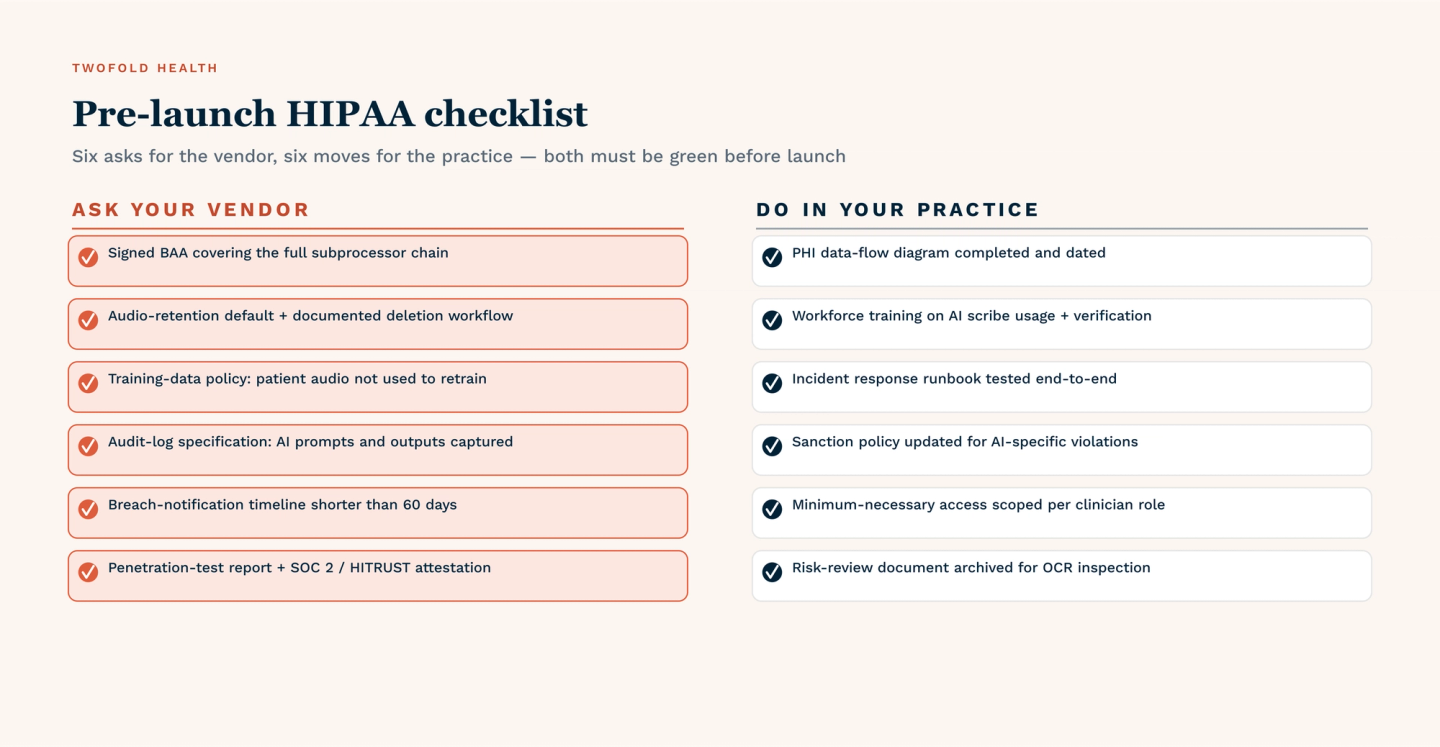
Pre-launch HIPAA checklist split into two columns of six items each. ASK YOUR VENDOR: signed BAA covering the full subprocessor chain; audio-retention default with documented deletion workflow; training-data policy confirming patient audio is not used to retrain; audit-log specification capturing AI prompts and outputs; breach-notification timeline shorter than 60 days; penetration-test report plus SOC 2 or HITRUST attestation. DO IN YOUR PRACTICE: PHI data-flow diagram completed and dated; workforce training on AI scribe usage and verification; incident response runbook tested end-to-end; sanction policy updated for AI-specific violations; minimum-necessary access scoped per clinician role; risk-review document archived for OCR inspection. Both columns must be green before launch.

Final Checklist Before Launch

Before any patient encounter is processed through your new AI note tool, verify each item below:

  1. Signed BAA and Reviewed Subprocessors: Confirm that every subcontractor coming into contact with PHI (e.g., OpenAI, AWS, Azure) has its own signed BAA with your vendor. Request the full subprocessor list in writing.
  2. Vendor SOC 2 Type II: Review the most recent report. Pay special attention to exceptions under the Security and Confidentiality trust criteria.
  3. Written Internal Policy For AI Note Review & Correction: Document the required workflow: AI generates a draft, the clinician verifies all clinical facts, manual corrections are applied, and final signature. This policy must be accessible to all staff.
  4. Staff Training Completed: Each provider and medical assistant who will use or review AI notes must complete a training module. Keep signed attestations for six years per HIPAA documentation rules.
  5. Technical Audit Logs Enabled: Verify that the AI tool generates logs capturing every access, edit, export, and deletion of PHI. Test that logs are tamper-proof and retrievable within 24 hours.

Conclusion

The four‑step framework above (data mapping, vendor vetting, technical audit, and workforce training) transforms abstract compliance into an actionable review process. Run the checklist, train your team, and then implement HIPAA-compliant AI notes with confidence, saving time without sacrificing patient privacy.


References

Adams, S. (2020, March 11). HIPAA “Required” Vs. “Addressable” Security Measures | blogMD. MicroMD.

Alder, S. (2024, October 20). What are the HIPAA Technical Safeguards? The HIPAA Journal.

Alder, S. (2026, January 5). HIPAA Business Associate Agreement - 2026 Update. The HIPAA Journal.

Alder, S. (2026, January 29). HIPAA Security Rule. The HIPAA Journal.

Falk, C. (2023, 5 10). The 5 SOC 2 Trust Services Criteria Explained. Cloud Security Alliance.

UC Berkeley. (2026). HIPAA PHI: Definition of PHI and List of 18 Identifiers. Human Research Protection Program |

FAQ

Frequently asked questions

  • Is a signed BAA enough to make any AI note tool HIPAA-compliant?

    No. A signed Business Associate Agreement (BAA) is necessary but not sufficient for compliance. HIPAA's Security Rule requires covered entities to conduct their own risk analysis regardless of vendor contracts.

    • What a BAA Covers: Liability, breach notification, and basic data handling promises.
    • Risk of Relying Only On A Baa: You learn about a violation only after a breach occurs, not before.
    • Best Practice: Treat a signed BAA as permission to begin your own technical and operational risk review, not as a substitute for one.

    See how to vet an AI vendor beyond the BAA.


  • How do I verify that an AI vendor is not using my patient data to train its models?

    You must ask for a specific written guarantee and then test it:

    1. What To Request In Writing: "Vendor agrees not to use any customer PHI, including audio, transcripts, or metadata, for model training, fine-tuning, or quality improvement purposes."
    2. Processing Requirement: The AI should delete all raw input (audio) and intermediate drafts immediately after generating the final note, typically within 24-48 hours.
    3. Subprocessor Check: Even if the primary vendor promises no training, their AI subprocessor (e.g., OpenAI, Anthropic) may have different policies. Verify both layers.
  • Can my practice be audited by the OCR for using AI notes even if no breach occurs?

    Yes. The OCR can initiate a compliance review at any time, with or without a reported breach.

    • What Triggers an Audit: Patient complaints, whistleblower reports, news articles about AI risks, or random selection under the OCR's audit program, etc.
    • What OCR Requests: Your risk analysis documentation, vendor BAAs, audit logs, workforce training records, and the specific policies governing AI note review and correction.
    • Best Practice: Document every step of your AI risk review, maintain signed staff attestations, and run regular internal audits of your AI note workflow.