


Most clinicians assume that adopting an AI medical scribe requires months of IT tickets, EHR vendor negotiations, and workflow chaos. In reality, the first AI‑generated note can appear within 30 minutes of sign‑up.
The difference between a fast and slow rollout comes down to preparation, not technology. This guide breaks down realistic timelines by clinic size and the hidden delays to avoid.
How AI Scribe Implementation in Clinics Works
Implementing an AI medical scribe is fundamentally different from implementing traditional EHR tools or voice recognition software. There is no complex hardware to install, no multi‑week training course, and no need to change how you talk to patients.
Most modern AI scribe platforms follow a simple, three‑step process that any clinician can complete between patient visits.
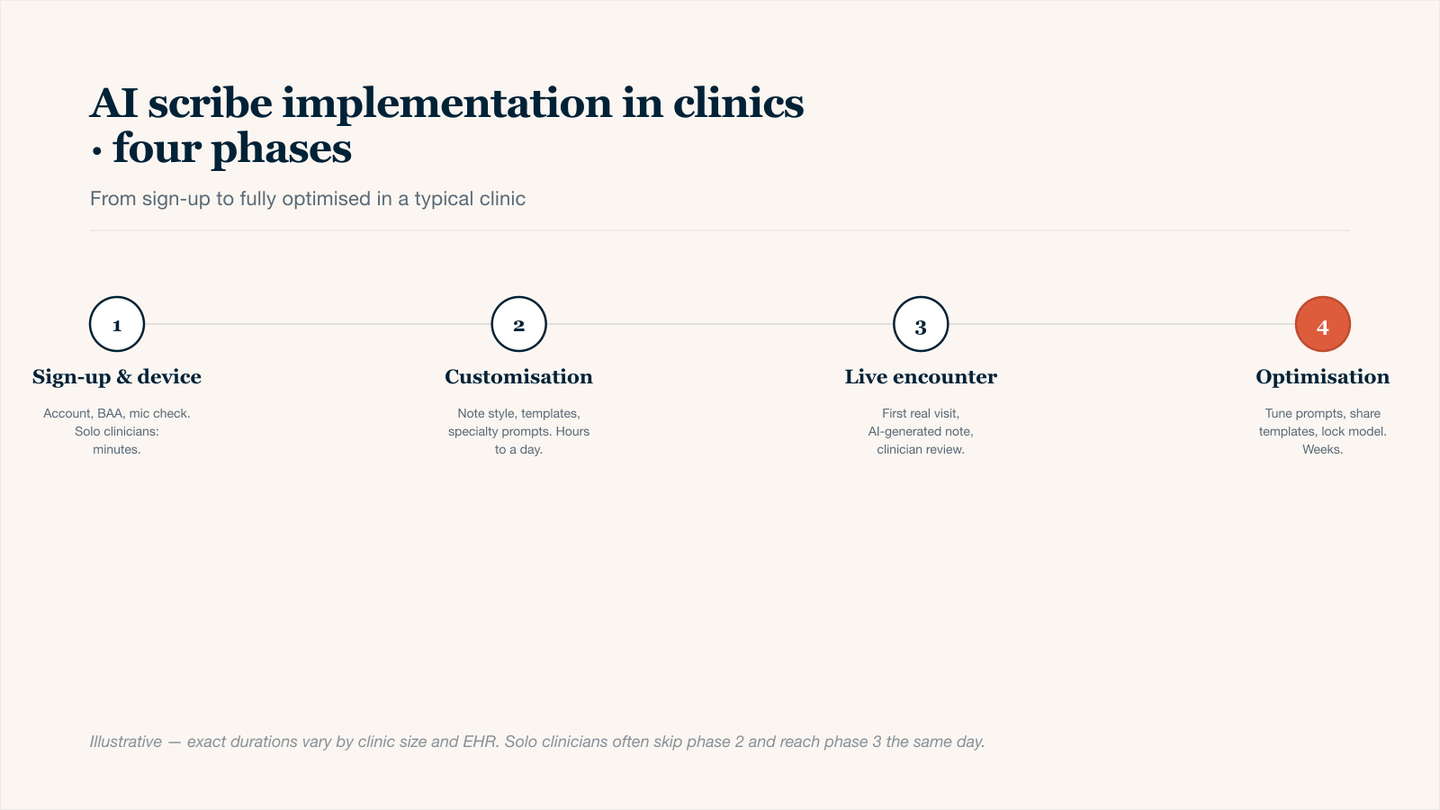
Four phases of AI scribe rollout — phase 1 is minutes for solo clinicians; phase 4 is ongoing.
Step 1: Sign-up and Device Setup
The first step takes less than five minutes. You create an account using your clinic email, confirm your specialty, and agree to the Business Associate Agreement (BAA) for HIPAA compliance.
Next, you choose your device. AI scribes work on:
- Laptop or desktop (Chrome, Edge, or Safari)
- Smartphone (iOS or Android app)
- Ambient device (a dedicated microphone or tablet placed in the exam room)
Step 2: Customization (Note Style, Templates, Preferences)
Before seeing your first patient, you spend 10–15 minutes teaching the AI how you write. This includes:
- Note structure (SOAP, DAP, or custom).
- Preferred language (e.g., "denies" vs. "reports no").
- Assessment & plan style (bullet points vs. paragraphs).
- Specialty-specific macros (e.g., ROS for rheumatology, dermatology body diagrams).
Most platforms offer pre‑built templates for over 50 specialties, so you are starting from 80% accuracy, not zero.
Step 3: Live Patient Encounter, AI-Generated Note, Human Review
During a real patient visit, you do nothing different. You talk, listen, examine, and counsel. The AI scribe runs silently in the background, converting the conversation into a structured clinical note.
Within seconds of ending the encounter, a draft note appears in your dashboard. Your job shifts from writing to reviewing. Most clinicians spend 30–60 seconds per note to confirm accuracy, add a few exam findings, and sign.
For more in-depth information, see how an AI scribe works during a patient visit.
Typical AI Scribe Implementation Timelines in Clinics
You can have your first AI‑generated patient note in under an hour. Full clinic adoption takes longer, but not by much. Below is an example breakdown.
Same-Day vs Full AI Scribe Implementation
Implementation Type | Time to First Note | Time to Full Adoption | Best For |
|---|---|---|---|
Same Day | 15-30 minutes | 1-2 days | Solo clinicians |
Standard | 24–48 hours | 2-5 days | Small practice |
Full (EHR integration and training) | 3-7 days | 2-4 weeks | Mid-size clinics |
Enterprise | 1-2 weeks | 2-3 months | Large health systems, academic centers |
Research Connection: A study in JAMA Network found the rate of same‑day appointment closures increased by 9.3% when ambient scribing was used.
AI Scribe Implementation Timelines by Clinic Size and Setup
How long you need depends mainly on how many clinicians are involved and whether you want EHR integration right away.
Immediate or Same-Day Setup for Individual Clinicians
Time to first note: 15–30 minutes.
Steps:
- Sign up online (no IT involved).
- Download the app on your phone or open it on your laptop.
- Test with a mock patient conversation (2 minutes).
- Go live with your next real patient.
AI Scribe Implementation in Small Practices (2–10 Providers)
Time for all providers to see first notes: 2–5 days.
Key steps:
- Day 1: Kickoff meeting + one provider sets up first.
- Day 2–3: Each provider customizes their note style (takes ~15 minutes each).
- Day 4–5: Providers review each other's AI notes, make small tweaks.
For more information, see how to set up an AI scribe for your practice.
AI Scribe Implementation in Mid-Size Clinics and Health Systems
Time: 2–7 weeks, depending on:
- How many different specialties you have (each may want different templates).
- Whether your EHR is ready for direct note-pushing.
- How long your compliance team takes to review HIPAA agreements.
Phased approach (recommended):
- Week 1: Pilot with 2–3 providers only.
- Week 2–3: Expand to one department.
- Week 4+: Full rollout to everyone.
Key Factors That Impact AI Scribe Implementation Time in Clinics
Some clinics fly through setup. Others struggle. Here is what makes the difference:
- Number of Providers: More providers don't have to mean slower, if you train them in parallel.
- Specialty Complexity: A psychiatrist and a dermatologist use very different templates. More specialties = more tuning.
- Device Ecosystem: Most AI scribes work on any smartphone or laptop, but if your clinic uses older iPads, test first.
How EHR Integration Affects AI Scribe Implementation
Do you need to connect your AI scribe directly to your EHR? Not right away. Many clinics start without integration and add it later.
- No Integration (copy-paste): Instant setup. You copy the AI-generated note and paste it into your EHR. Takes 10 seconds per patient. Most clinics start here.
- Basic Integration: Adds 1–3 days. The AI scribe sends the note directly to your EHR with one click. No copy-pasting.
- Full Integration (bidirectional): Adds 1–4 weeks. The AI scribe can pull patient demographics, past medical history, and problem lists from your EHR. This is powerful but takes longer to set up.
Tip: Start simple. Add deeper integration after you have seen value.
Training and Workflow Optimization in AI Scribe Implementation in Clinics
- Core training (required for everyone): 10–15 minutes. How to start/stop recording, where to find notes, how to edit, and sign.
- Specialty Tuning (optional but helpful): 30–60 minutes per provider. Teaching the AI your preferred phrases, template layout, and common assessment plans.
- Workflow Integration: 1–2 clinic sessions. Learning exactly when to hit record, how to narrate naturally, and when to review the note.
Common Delays in AI Scribe Implementation and How to Avoid Them
Delay | How to Avoid It |
|---|---|
No one is in charge of the rollout | Assign a 'clinician in charge' before you sign up |
Spending days perfecting templates before using the tool | Start with default templates. Adjust after 10 notes |
Poor audio quality (bad WiFi, cheap laptop mic) | Test with your phone first |
Waiting for EHR integration | Begin with copy-paste. Add API integration later |
Best Practices to Speed Up AI Scribe Implementation in Clinics
These four practices consistently cut implementation time in half.
- Start with One Provider: Pick your most tech-comfortable clinician. Get them live in one day. Use their success to convince the rest.
- Resist Template Perfectionism: An 80% accurate note on day one is a win. You can reach above 90% as time passes.
- Schedule Two 15-minute Check-Ins During the First Week. One on day two. One on day five. Answer questions, fix small frustrations, etc.
- Measure Something Simple. Track one metric: "Did I finish notes before leaving the clinic?" Seeing that number go up is motivating.
What Changes After AI Scribe Implementation in Clinics Is Complete
Once your AI scribe is fully adopted, your day looks different. Here is what clinicians consistently report:
Before AI Scribe:
- Typing or dictating during patient visits (less eye contact).
- Remembering details to write down later (mental fatigue).
- 1–2 hours of after-hours charting each night.
- Notes are often finished days later.
After AI Scribe (Fully Optimized):
- Full attention to the patient during the visit.
- No mental note-taking, just be present.
- Notes reviewed and signed within 5 minutes of the patient leaving.
- Leave the clinic on time. Go home.
Faster AI Scribe Implementation in Clinics with Twofold
Twofold's AI medical scribe for clinicians eliminates the three biggest delays that plague most AI scribe rollouts: training, template building, and compliance reviews.
- Zero Training Required: Most clinicians open the app, press record, and have a usable note after one patient visit.
- Pre-built Specialty Templates: Twofold comes with templates already tuned for specialties like primary care, dermatology, psychiatry, orthopedics, and cardiology, as well as custom options.
- No Compliance Delays: Twofold provides a signed BAA (Business Associate Agreement) and SOC2 reports instantly. Your legal team has nothing to negotiate.
- EHR integration is optional, not required: Start with copy-paste in 10 seconds per patient. Add API integration later if you want it. Most clinics never need to.
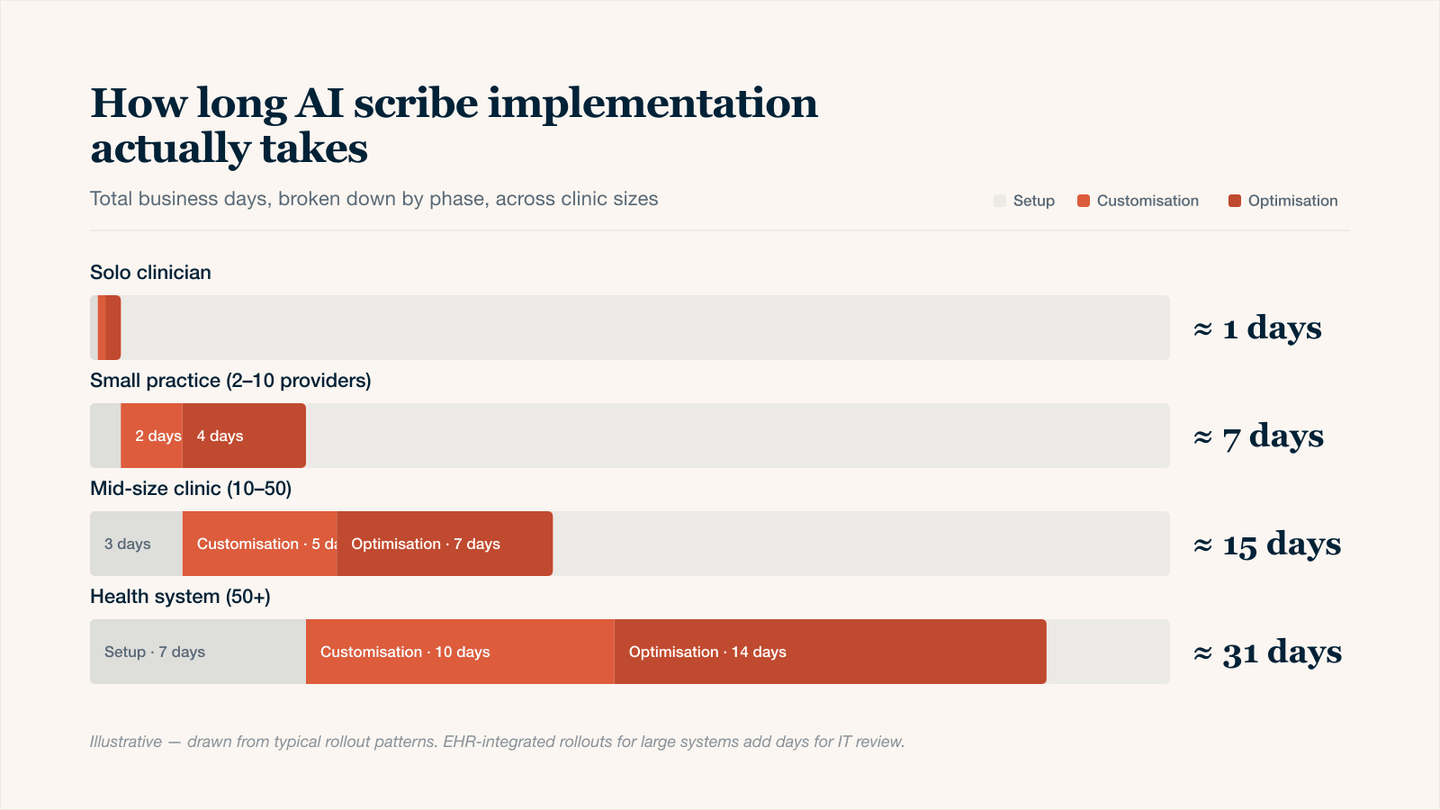
Implementation time by clinic size — solo clinicians in under a day; health systems in about a month.
Conclusion
Most clinics overthink AI scribe implementation. The reality is simple: your first AI‑generated patient note is 15–30 minutes away. One provider can be fully comfortable within days, and a small practice can go live in one to two weeks. The biggest delay is rarely technology; it is waiting for perfect templates or trying to train everyone at once. Start with one provider, one device, and prove value first. Then scale. The only way to know how long it takes for your clinic is to try it.