


Medical school demands the ability to juggle an overwhelming volume of information, leading to burnout during clinical rotations. While general AI tools are abundant, students need solutions that understand clinical context. This guide explores the 7 best AI tools for medical students that actually help. From study aids to an AI medical scribe, we break down the essential AI scribe tools for studying, research, and your clinical prep.
What Medical Students Are Actually Asking About AI on Reddit
Reddit's r/medicalschool has become a popular forum for AI debate. Here's what students actually discuss:
- Enhancement vs. Replacement: AI is seen as a study aid, not a physician replacement.
- Study Tools: NotebookLM and Claude are popular. Hallucinations are dealbreakers for students. ChatGPT helps with general knowledge, less so with clinical skills.
- Practical Advice: Verify everything. Active recall > summarization. Beware of astroturfing.
Best AI Tools for Medical Students: TL;DR
Tool | Best For | Stage |
|---|---|---|
Twofold | Clinical documentation and Ward prep | Clinical (years 3 and 4) |
AMBOSS | Knowledge acquisition and Board prep | Pre-clinical and clinical |
NotebookLM | Research | All |
Vera Health | Patient education and summarization | Clinical |
Anki | Spaced repetition and memory | Pre-clinical |
Consensus | Literature reviews | Research/All stages |
SciSpace | Paper analysis | Research |
7 Best AI Tools for Medical Students
Below are the most popular tools among medical students, as well as fit recommendations:
1. Twofold
Overview: A specialized AI medical scribe designed to help students draft clinical notes efficiently. It bridges the gap between classroom knowledge and clinical application.
- Why it Stands Out: Unlike general dictation tools, it structures notes according to clinical standards (SOAP, APSO).
Twofold is for you if:
- You are struggling to keep up with note-writing during rotations.
- You want to learn proper clinical note structure.
- You need a tool that understands medical terminology contextually.
Twofold is not for you if:
- You are a pre-clinical student with no patient interaction.
- You are looking for a tool to memorize anatomy.
2. AMBOSS
Overview: It combines a comprehensive knowledge library with a question bank.
AMBOSS is for you if:
- You need integrated clinical knowledge and exam prep.
- You prefer reading concise, high-yield summaries over textbooks.
AMBOSS is not for you if:
- You are on a strict budget.
- You prefer video-based learning over text.
3. NotebookLM
Overview: A Google tool that acts as a 'source‑grounded' AI. You upload your lecture notes/PDFs, and it only answers based on those documents.
- Why it Matters: It sharply reduces the risk of hallucinations.
NotebookLM is for you if:
- You need to synthesize multiple pages of lecture slides quickly.
- You want to generate study guides from provided course material.
- You need to summarize complex lecture notes.
NotebookLM is not for you if:
- You need general medical knowledge not contained in your uploads.
- You require diagnostic support (it is for study, not diagnosis).
4. Vera Health
Overview: An AI platform focused on simplifying medical jargon for patients.
- Use Case: Helps students practice patient communication.
Vera Health is for you if:
- You need to translate complex diagnoses into plain English.
- You are practicing patient presentations.
- You want to improve health literacy in your patient interactions.
Vera Health is not for you if:
- You are looking for a note-taking app.
5. Anki With AI Plugins
Overview: Anki is a great option for spaced repetition. AI plugins help automate card creation.
- The Upgrade: Instead of manual entry, AI parses lecture slides to generate flashcards.
Anki + AI is for you if:
- You are a pre-clinical student drowning in content.
- You believe in spaced repetition but hate making cards.
Anki + AI is not for you if:
- You prefer conceptual understanding over note memorization.
- You are in clinical years and have no time for flashcard maintenance.
6. Consensus
Overview: An AI search engine that answers questions using peer‑reviewed papers.
Consensus is for you if:
- You are writing a research paper or case report.
- You need evidence-based answers for a clinical question.
- You want to avoid biased sources.
Consensus is not for you if:
- You need a quick answer for a basic science concept.
- You are looking for treatment guidelines.
7. SciSpace
Overview: An AI research assistant for reading PDFs. It explains math, tables, and jargon within a paper.
SciSpace is for you if:
- You struggle with dense statistical analysis in papers.
- You need to extract methods sections quickly.
- You are doing a deep literature review.
SciSpace is not for you if:
- You are doing a general study (it is research-focused).
- You don't work with PDFs.
AI Tools for Medical Students Comparison Overview
Tool | Best For | Free Tier | Works on Mobile |
|---|---|---|---|
Twofold | Clinical Note Drafting | 7-day free trial | Yes |
AMBOSS | Board Prep & Knowledge | No | Yes |
NotebookLM | Source-grounded study | Yes | Yes (limited features) |
Vera Health | Patient Communication | Yes | Yes |
Anki (AI) | Memory Retention | Yes | Yes |
Consensus | Evidence-based search | Yes | Yes |
SciSpace | Research paper analysis | Yes | Yes |
Three Categories of AI That Actually Matter in Med School
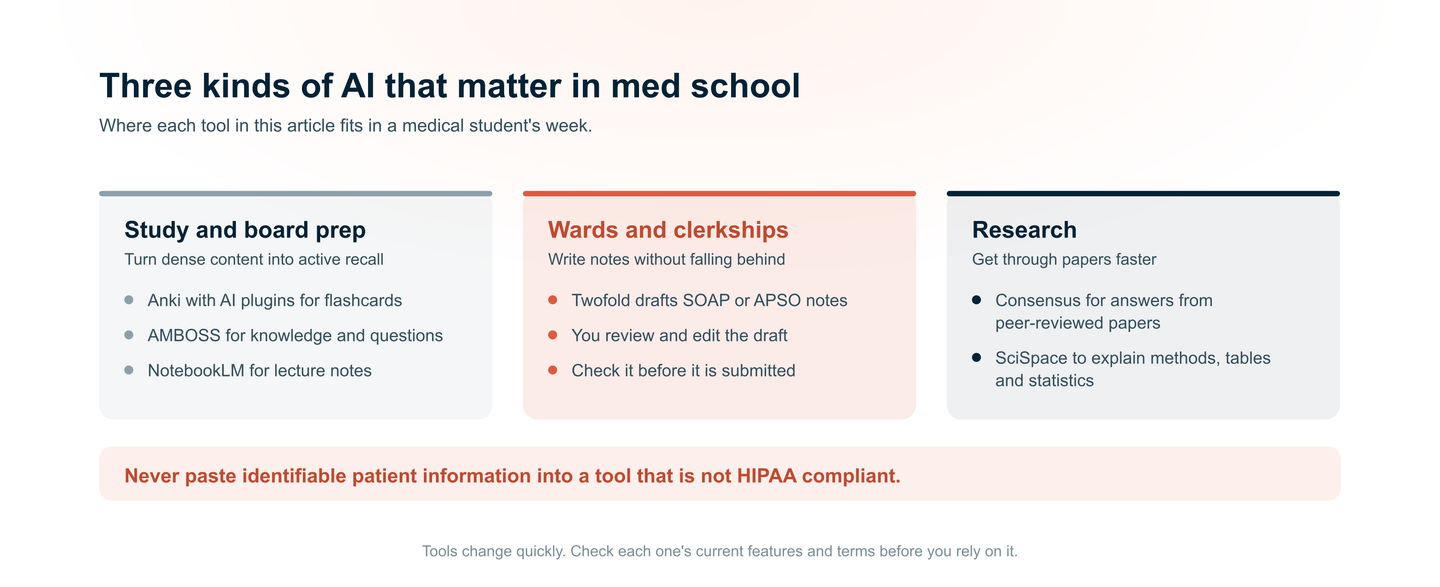
In medical school, these three categories are consistent for students' workflow: study prep, clinical documentation, and research. Here's what each looks like and which tools are best.
Study and Board Prep: Turning Dense Content Into Active Recall
- The Problem: Passive rereading feels productive but yields poor retention. Active recall (testing yourself) is proven to work, but creating questions takes hours.
- How AI helps: Tools like Anki with AI plugins automatically generate flashcards from lecture slides. AMBOSS combines a knowledge library with a question bank, using AI to flag weak areas.
- Key Takeaway: AI doesn't replace studying; it removes the busywork so you can spend less time rewriting.
Wards and Clerkships: Writing Notes Without Falling Behind
- The Problem: Clinical rotations drown students in documentation.
- How AI helps: Specialized AI scribe tools like Twofold draft notes in standard clinical formats. You review, edit, and learn structure, without starting from a blank page.
- Critical Caveat: Always verify before submitting.
Research and Literature: Understanding Papers Without a Translator
- The Problem: Medical literature is dense, statistical, and time-consuming. Students writing case reports or reviewing evidence often get stuck decoding methods sections.
- How AI helps: Consensus answers clinical questions using peer-reviewed sources and shows scientific agreement. SciSpace explains math, tables, and jargon inside PDFs.
- Key Takeaway: These tools speed up literature reviews and help you extract findings, so you can focus on interpretation, not translation.
How to Use AI in Med School Without Getting Burned Out
- Verify AI-Generated Clinical Information Before Applying It: AI can hallucinate, so this is a mandatory step.
- Use the RTFC Framework When Prompting General Models: Role, Task, Format, Context.
- Never Paste Identifiable Patient Information Into Non-HIPAA Tools: Learn more on the critical distinction between free vs. paid AI scribe tools.
- Treat AI as a Draft Generator, Not a Final Answer: It is your signature on the note, so you are liable.
How Twofold Helps Medical Students Survive Ward Rotations
Between pre‑rounding, presenting, and documenting, students often spend more time on notes than on learning. Twofold is here to help.
- Learn Note Structure by Writing Notes: Twofold drafts clinical notes in standard formats, SOAP, APSO, and more, so you see how a proper note should flow.
- Cut Chart Review Time Without Cutting Corners: Twofold speeds up pre-rounding by organizing patient information into a clear, editable draft.
- Try It Free for a Week: Twofold has a 7-day free trial with the full product, and no credit card is needed to start. It works on mobile, so you can draft notes between patients or after rounds.
Conclusion
Medical school will not get easier, but your tools can get smarter. AI will not replace clinical judgment, but it can eliminate the administrative burden that steals your learning time. Start with one tool, whether it's Anki for recall, Consensus for research, or Twofold for ward documentation. The goal is not to outsource thinking; it's to free your mind for what matters: becoming a better physician. Explore Twofold's AI clinical notes and take back your rotations.