


Brief Answer
You can safely use an AI scribe and still fully respect patients who do not want recording by doing three things. First, offer the tool as an option with a clear, neutral script and an easy opt out. Second, have a fallback documentation method ready, for example a short spoken or typed summary into the scribe after the visit without recording the patient. Third, document the preference in the chart and note when the AI scribe was not used. Care should be identical whether or not recording is on.
The Longer Answer
A practical way to think about this is: patient choice, alternative workflows, and documentation.
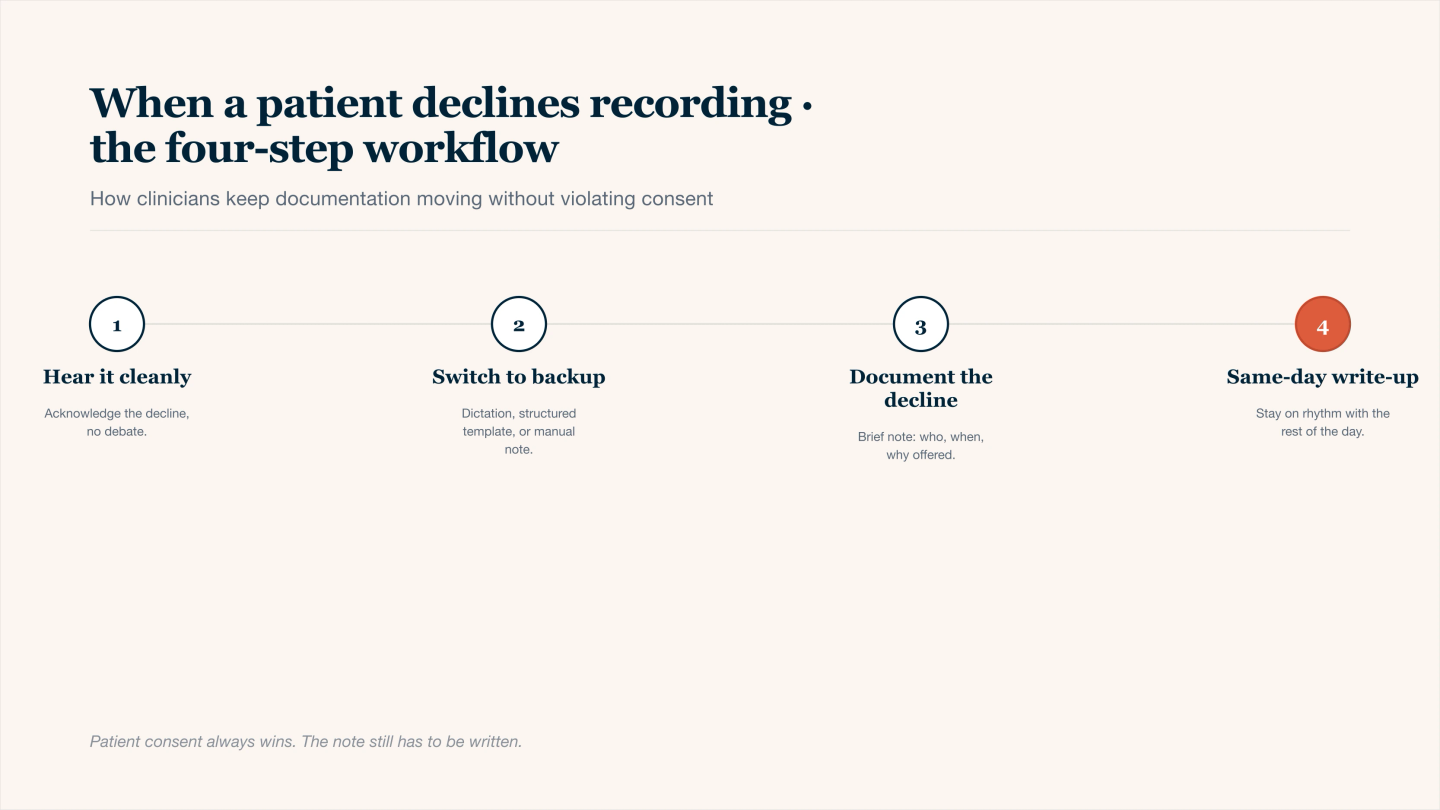
When a patient declines recording — the four-step workflow that protects consent.
1. Core principles when a patient declines recording
Principle | What it means in practice | Example in the room |
|---|---|---|
Respect and choice | AI scribe is optional, not required | "We use a tool that helps with notes. If you prefer not to, we simply will not use it today." |
Transparency | Brief, plain language about what the tool does and does not do | "It helps me create notes from what I say, your care is the same either way." |
Equivalence of care | No change in clinical effort or engagement if they say no | Same session length, same depth, no visible frustration |
Minimal data | Capture only what is needed for care and documentation | Use pause or mute during sensitive topics |
Documented preference | Record that the patient declined recording, without judgment | "Client declined use of AI scribe for this visit. Standard manual note completed." |
This frame helps you decide quickly in the moment without debating each case.
2. Step by step workflow when someone says "no recording"
Before the visit
- Use a chart flag or banner to note prior preference so you do not need the same long explanation every time.
- Decide which visits will default to AI and which will default to manual notes if you already know the patient is uncomfortable.
At the start of the visit
A simple, neutral script can be:
"I use a secure tool that helps turn what I say during sessions into my clinical notes so I can focus more on you and less on typing. If you would rather I not use it, that is completely fine and I will take notes the usual way."
Then pause and let them answer.
If the patient declines
- Acknowledge and normalize
- "No problem at all, we will keep it off for today."
- Turn off or pause the scribe immediately.
- Do not revisit unless clinically relevant or the patient later asks.
After the visit
Switch to your fallback method, for example a short summary spoken alone in your office or a quick typed outline that you later expand with AI.
3. Options when you cannot record, but still want AI help
Option | How it works | Pros | Watch outs |
|---|---|---|---|
Post visit summary dictation | After the patient leaves, you record a brief summary of the session into the AI tool | No patient voice captured, still faster than full manual notes | Needs one or two minutes of quiet time between visits |
Clinician only recap during visit | At the end, you say a brief recap while the tool is listening but keep content general and focused on your perspective | Captures your reasoning, not every detail | Still counts as capture, so only if consistent with the preference you discussed |
Typed bullet outline then AI expansion | You type three to five bullets, then let AI turn that into a formatted note | Works for patients who dislike audio recording | Slightly more typing, but still less than writing full notes |
Hybrid policy by visit type | Use AI scribe only for low sensitivity visits, never for specific patients or topics | Reduces friction in areas where concern is highest | Requires clear internal rules so you stay consistent |
Many clinicians choose one main fallback and use it every time a patient opts out, which keeps cognitive load low.
4. How to talk about privacy and consent in simple language
You can keep the explanation short and repeatable.
- Emphasize purpose
- "This is to help me finish accurate notes so I can be more present with you."
- Clarify safety
- "The tool is built for healthcare and follows privacy rules, and I still review and sign every note."
- Make the choice explicit
- "If you prefer not to use it, your visit and your care are the same. I will just document in the usual way."
If you use written consent forms, you can include a simple clause about use of transcription or AI note tools with an option to decline.
5. What to document when a patient refuses recording
You do not need a long statement. You do want a clear record that the preference was respected.
Examples:
- "Reviewed optional AI assisted documentation. Patient declined recording for this session. Manual note completed."
- "Patient prefers not to use audio based scribe. This preference will be honored for future visits unless they request a change."
For risk sensitive contexts, you may also document if you used a non recording workflow, such as post visit dictation that contains only your own summary.