


To cancel Freed AI, sign in to your Freed account on a web browser, open Settings via the gear icon, go to Plan and Billing → Subscription, and complete the cancellation on the Stripe billing page you're redirected to. You keep full access until the end of your current billing cycle, and Freed does not offer refunds by default — so on an annual plan, timing matters. If you subscribed through the Apple App Store or Google Play, you must cancel through Apple or Google instead; Freed cannot modify those subscriptions.
This guide covers the exact steps, Freed's refund policy, what happens to your notes and templates after you cancel, and how to switch to a new AI scribe without a gap in your documentation workflow.
Disclosure: this guide is published by Twofold Health, an AI scribe many clinicians choose as a Freed alternative. Every Freed policy detail below is drawn from Freed's official help center, linked in Sources, and was last verified in July 2026. Policies and pricing change — confirm current terms on Freed's site before you act.
How to Cancel Freed AI (Step by Step)
If you subscribed through the Apple App Store or Google Play, cancel in your Apple or Google subscription settings instead. Per Freed's help center, Freed cannot manage or modify any App Store or Google Play subscriptions — including cancellations, refunds, or billing adjustments.
Does Freed AI Offer Refunds?
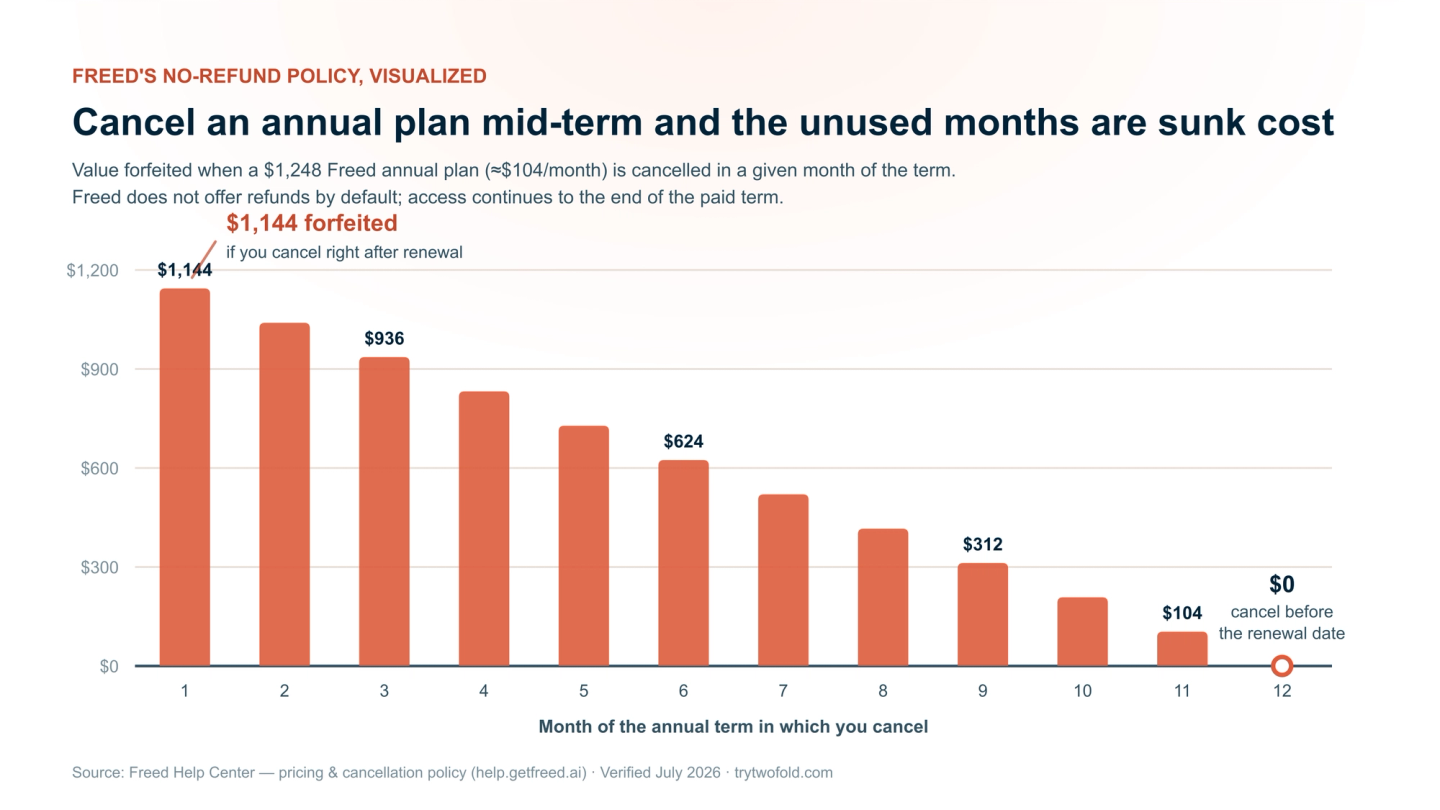
No — Freed states that it does not offer refunds by default for any cancellations. On a monthly plan, the worst case is paying through the current month. On the annual Premier plan ($1,248 billed upfront), cancelling mid‑term means the unused months are a sunk cost — you keep access until the term ends, but the money is not returned.
If you believe your situation warrants an exception — for example, a billing error or duplicate charge — contact Freed's support through the in‑app messenger or support@getfreed.ai. Exceptions are case by case; the only reliable protection is a calendar reminder a week before your renewal date.
What Happens to Your Notes and Templates After You Cancel
According to Freed's help center, cancelling a subscription does not immediately erase your work:
- You retain full access to your Freed account until the end of the current billing cycle.
- All templates and personalization are retained in your account after cancellation.
- Notes depend on your retention setting: if set to keep notes forever, they remain accessible; if set to auto-delete after 30 days, they are removed automatically on that schedule.
- Your account itself remains intact unless you separately request permanent deletion from Freed support.
Before You Cancel: A 10-Minute Checklist
Why Clinicians Cancel Freed
Freed is a capable ambient scribe, and clinicians consistently praise its time savings. But a few themes recur in reviews and forum threads when clinicians explain a switch:
- Editing overhead — the Assessment & Plan can be over-inclusive, and some clinicians report spending longer editing than they would writing.
"I found myself taking 10 minutes to edit the freed note when it would've taken me five minutes to compose it on my own." — Carl Kasselvania (Apple App Store)
- Note caps on the entry plan — Starter ($39/mo) is limited to 40 notes per month, so a full caseload effectively requires Core at $79/mo.
- Generic-sounding notes — Freed offers templates and a template builder, but clinicians who want notes in their own clinical voice often look for style learning.
- Mental-health depth — therapists and psychiatric clinicians frequently want treatment plans, progress tracking across sessions, and therapy-native formats beyond a standard SOAP.
For the full breakdown of where each tool is stronger, see our Freed vs Twofold comparison and the Freed AI pricing guide.
Choosing a Replacement: What to Compare
Whatever you switch to, evaluate it on the dimensions that made you cancel — not on a feature list. The criteria that matter most for clinicians leaving Freed:
- Predictable pricing with no note caps — a flat price that doesn't climb when your caseload does.
- Notes in your clinical voice — the tool should learn your phrasing and detail level, not fight it.
- Multiple capture modes — ambient recording for sessions, dictation or a typed summary for the visits you don't record.
- Specialty depth — for behavioral health especially: SOAP, DAP, BIRP, GIRP, treatment plans, and progress tracking across sessions.
- EHR independence — it should work alongside the EHR you already use, with no platform switch.
- Security posture — a signed BAA on every plan, and clarity on whether audio is stored at all.
- A trial you can run before your Freed access ends — ideally without a credit card.
Where Twofold Stands as the Freed Alternative
Twofold Health is built around exactly the friction points above, which is why it consistently tops our and third‑party Freed alternative rankings. It generates notes in your own clinical voice — learning your phrasing over your first few sessions — supports ambient, dictation, and typed‑summary capture, includes unlimited notes on every paid plan, and adds the mental‑health depth (treatment plans, progress tracking, DAP/BIRP/GIRP and 70+ templates) that generalist scribes treat as an afterthought. Every account gets a signed BAA, audio is never stored, and it works alongside any EHR.
What switchers check | Freed | Twofold |
|---|---|---|
Unlimited notes | Core plan and up ($79/mo); Starter capped at 40 notes/mo | Every paid plan, flat price |
Capture modes | Ambient recording | Ambient, dictation, or typed summary |
Clinical voice | Templates + template builder | Learns your phrasing and detail level |
Mental-health depth | General specialty templates | 70+ templates incl. DAP/BIRP/GIRP, treatment plans, progress tracking |
Coding support | Coding assistance on Premier ($119/mo) | CPT and ICD-10 coding included |
EHR fit | Works alongside your EHR; EHR features on Premier | EHR-agnostic — works alongside any EHR |
HIPAA / BAA | HIPAA compliant | HIPAA compliant; signed BAA on every plan; audio never stored |
Trial | 7-day free trial | 7-day free trial, no card required |
Freed and Twofold pricing/features above were last verified in July 2026 on each vendor's site — check current details before you commit.
If you want the wider field, our Best Freed AI alternatives roundup compares eight options, and the Best overall Freed alternative analysis goes deep on the head‑to‑head.
Use Your Remaining Freed Access to Test the Switch
Because Freed access runs through the end of your billing cycle, you can evaluate a replacement side by side on real visits with zero documentation gap:
Bottom Line
Cancelling Freed takes two minutes: Settings → Plan and Billing → Subscription → confirm in Stripe (or via Apple/Google if you subscribed there). The decisions that actually matter are timing — cancel before renewal, because there are no refunds by default — and continuity: secure your notes, rebuild your templates, and trial the replacement while your access is still live. If Freed's editing overhead, note caps, or generic voice are why you're leaving, start a Twofold trial during your remaining Freed window and compare them on your own visits.