


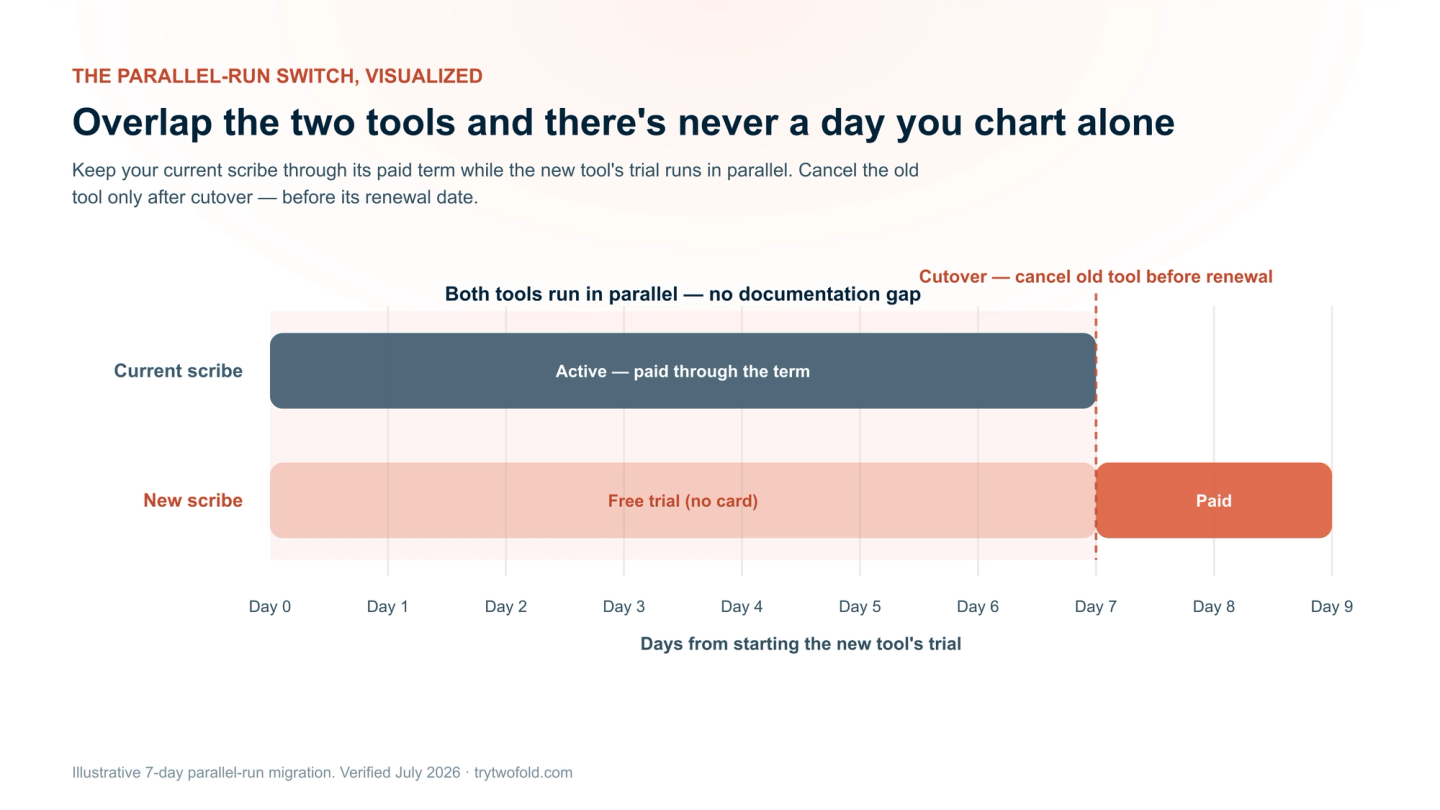
To switch AI scribes without losing notes, templates, or a week of charting, run the old and new tools in parallel before you cancel: keep your current scribe active through its paid term, start the new tool's trial during that window, confirm your finished notes are in your EHR (not just the scribe), rebuild your handful of daily templates in the new tool, and only let the old subscription lapse once the new one is carrying your visits cleanly. Done this way, there is never a day when you're charting unassisted.
This guide walks through the whole migration — what actually moves with you, what you rebuild, how to keep patient consent and HIPAA clean, and a day‑by‑day timeline that avoids any documentation gap.
Disclosure: this guide is published by Twofold Health, an AI scribe. The migration steps are vendor‑neutral and apply no matter which tool you're leaving or joining; where we reference Twofold specifics (trial terms, BAA), those were verified on trytwofold.com in July 2026.
What Actually Moves With You — and What You Rebuild
The single biggest source of switching anxiety is a false one: that you'll lose your work. In practice, most of what matters either stays where it already belongs (your EHR) or is quick to recreate. Here's the honest breakdown:
Asset | What happens when you switch | Your action |
|---|---|---|
Signed/finished notes | Already in your EHR — the chart is your legal record, not the scribe | Confirm recent notes are in the chart |
Draft notes in the old tool | Stay in the old tool until its retention window ends | Copy any unfinished drafts into your EHR |
Custom templates | Do not transfer between vendors | Rebuild your 2–3 daily templates in the new tool |
Audio recordings | Typically never exportable (and often never stored) | None — you don't need them once notes are signed |
Your clinical voice/style | The new tool learns it over a few sessions | Edit the first few notes so it learns faster |
The BAA | Does not carry over — it's per vendor | Sign the new vendor's BAA; offboard the old one |
How to Switch AI Scribes (Step by Step)
Keeping Patient Consent and HIPAA Clean Through the Switch
Switching tools is a good moment to tighten, not loosen, your compliance. Three things to handle:
- Consent language: if you tell patients which tool you use or name your vendor in a consent script, update it. If your consent is tool-agnostic ("an AI assistant helps me document"), you may not need changes — but review it.
- New BAA before real PHI: sign the new vendor's Business Associate Agreement before you run a real patient visit through it. A free trial without a BAA is fine for a test with dummy data, not live PHI.
- Offboard the old vendor: after you cancel, confirm what happens to any data the old tool held — request deletion if that's your policy, and keep the termination and BAA records.
The 7-Day Switch Timeline (No Documentation Gap)
The whole point of overlapping the two tools is that there's never a day you're charting alone. A typical week:
What to Look for in the Tool You're Switching To
If you're switching, switch to something that removes the reasons you left. The criteria that matter most:
- Everything included — unlimited notes and advanced actions, with no monthly caps or metering.
- Predictable, flat pricing that won't jump at your next renewal.
- Notes in your clinical voice — style learning, not a rigid template you fight.
- Multiple capture modes — ambient recording, plus dictation or a typed summary for visits you don't record.
- Specialty depth — for behavioral health especially: SOAP, DAP, BIRP, GIRP, treatment plans, and progress tracking.
- EHR independence — works alongside the EHR you already use, no platform switch.
- A signed BAA on every plan, and clarity on whether audio is stored.
- A no-card trial so you can run the parallel week without commitment.
Why Twofold Is a Clean Place to Land
Twofold Health is designed for exactly this switch. Its 7‑day trial needs no credit card, so the parallel week carries no double‑billing risk; every paid plan includes unlimited notes and advanced actions with no metering; it learns your clinical voice over the first few sessions; it captures ambient, dictated, or typed‑summary visits; and it adds behavioral‑health depth (treatment plans, progress tracking, DAP/BIRP/GIRP and 70+ templates) that generalist scribes leave out. Every account gets a signed BAA, audio is never stored, and it works alongside any EHR — so migration is a template rebuild and a few sessions of style learning, not a project.
Already leaving a specific tool? We have step‑by‑step cancel guides for Freed and Heidi, plus deeper comparisons of Freed vs Twofold and Heidi vs Twofold.
Bottom Line
Switching AI scribes is low‑risk if you overlap instead of cutting over cold: keep the old tool through its paid term, trial the new one in parallel, rebuild your two or three daily templates, confirm notes land in your EHR, and only then cancel — before the old renewal date. Your finished notes were never at risk; they live in the chart. To run the parallel week with no card and no commitment, start a Twofold trial and compare it against your current tool on your own visits.