

Free for a week, then $19 for your first month
Expert Advice

The Best Review Workflow for AI Therapy Notes: Edit Fast Without Missing Important Context

Edit AI therapy notes faster with a workflow that doesn't lose clinical context.

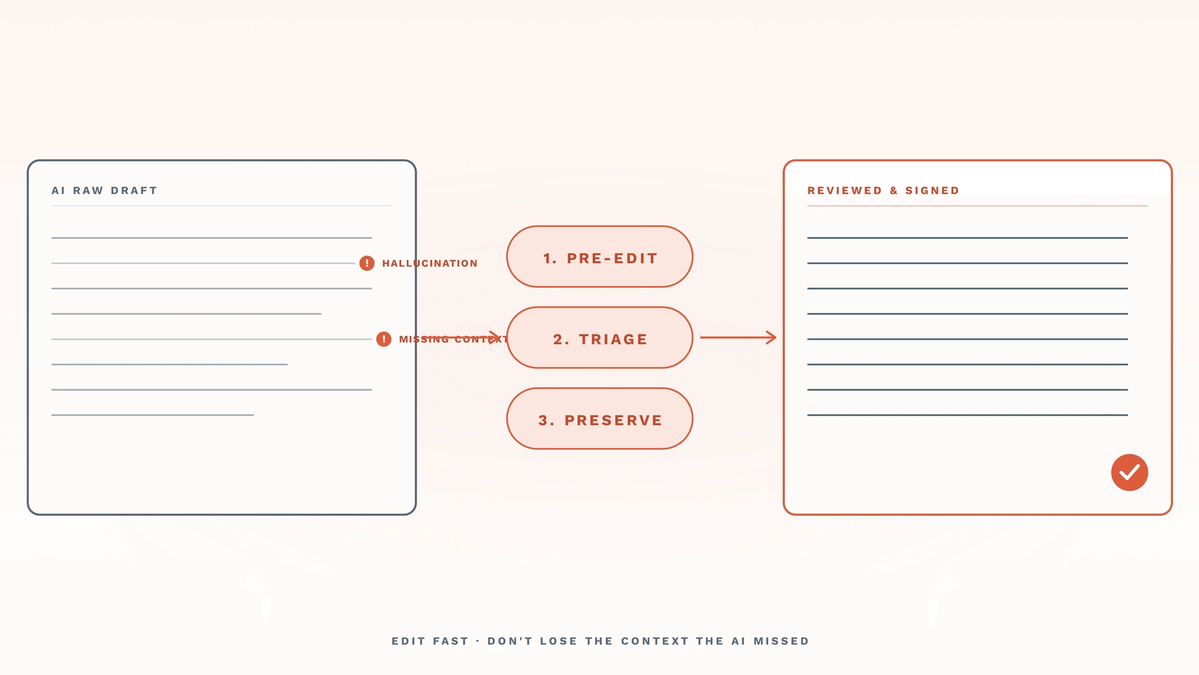
Two stacked-line note cards illustrating the AI therapy note review workflow. Left card 'AI RAW DRAFT' shows muted-ink note lines with two coral '!' flags marking 'HALLUCINATION' and 'MISSING CONTEXT' issues. Right card 'REVIEWED & SIGNED' shows clean ink lines and a coral checkmark in the corner. Between the cards sit three coral pill badges stacked vertically: '1. PRE-EDIT', '2. TRIAGE', '3. PRESERVE'. Coral arrows connect left → badges → right. Bottom label reads 'EDIT FAST · DON'T LOSE THE CONTEXT THE AI MISSED'. The hero captures the article's central argument: a structured three-step review turns a flag-heavy AI draft into a signable note without losing clinical context.

As a mental health practitioner, you’ve embraced AI therapy notes to save time, but now you worry about losing the subtle clinical details that matter most. Rushing through edits flattens therapeutic nuance; reading every word slowly defeats the purpose of using AI. The solution isn’t choosing one over the other; it’s a structured review workflow that trains your eye to spot what to keep, what to tweak, and what only you can add. Discover how to edit faster, preserving everything from relational shifts to risk indicators.
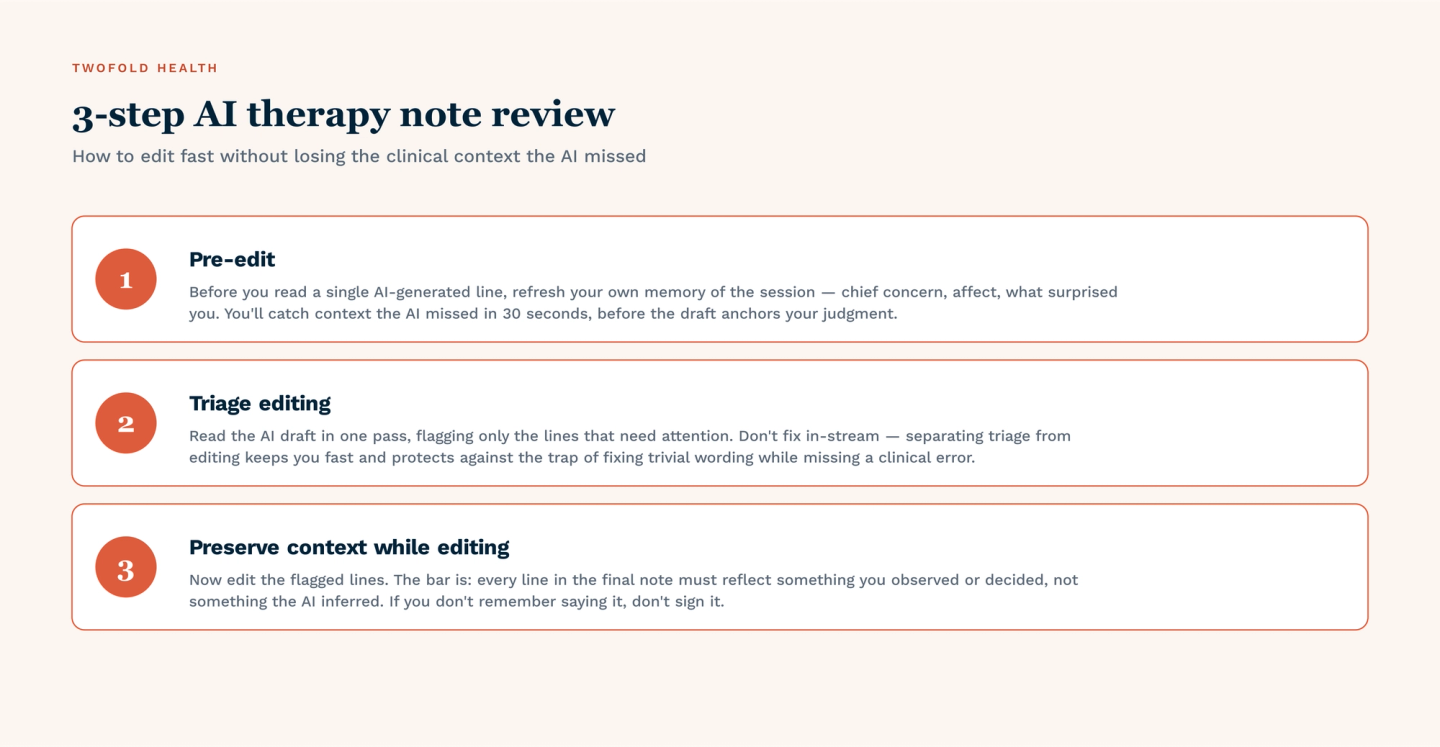
Three-step AI therapy note review workflow. (1) Pre-edit — before reading the AI draft, refresh your own memory of the session: chief concern, affect, what surprised you. You'll catch context the AI missed in 30 seconds before the draft anchors your judgment. (2) Triage editing — read the draft in one pass, flagging only the lines that need attention. Don't fix in-stream; separating triage from editing keeps you fast and prevents the trap of fixing trivial wording while missing a clinical error. (3) Preserve context while editing — every line in the final note must reflect something you observed or decided, not something the AI inferred. If you don't remember saying it, don't sign it.

Step 1: The Pre-Edit

The most powerful editing tool for AI therapy notes is your own clinical memory. AI cannot register a client’s non‑verbal expressions (a tear quickly wiped away, or the weight of a long silence).

If you open the AI‑generated note before mentally replaying the session, you’ll unconsciously accept its framing. By refreshing your memory first, you create a mental checklist of what must appear in the final note.

Review The Session Data Before Looking At The AI Output

Immediately after the client leaves (or the video ends), take 90 seconds to mentally go over the session without any technology. Ask yourself three questions:

  • What was the client’s predominant affect (e.g., anxious, flat, tearful, guarded)?
  • Did any unexpected shift occur (e.g., sudden withdrawal, a moment of laughter, avoidance of eye contact)?
  • What was the single most clinically relevant exchange?

Only after this scan should you open your AI therapy note tool. This primes your brain to spot omissions, not just typos.

Step 2: Triage Editing

Once you have your AI‑generated note, triage it using a simple traffic light system (like the one used in the Emergency Department).

  • Green (Keep): Objective data, attendance, interventions used.
    • Example: “Client arrived on time. The therapist used CBT cognitive restructuring. Session lasted around 50 minutes.”
    • Action: Skim these sections for factual errors only. Do not rewrite.
  • Yellow (Edit): Generic therapeutic phrases that lack specificity.
    • Example: AI writes “Client discussed feelings about work.” You edit to: “Client expressed shame about being passed over for promotion, stating ‘I’m never good enough.’”
    • Action: Replace vague verbs (discussed, explored, processed) with precise emotional or behavioral language.
  • Red (Rewrite): Missing safety concerns, cultural context, or contradictory statements.
    • Example: AI fails to note a passive suicidal comment or ignores a client’s religious identity that shapes their coping.
    • Action: Delete the AI’s placeholder language and write 1–2 sentences directly from your memory, refresh bullet points. This is non-negotiable for risk management.
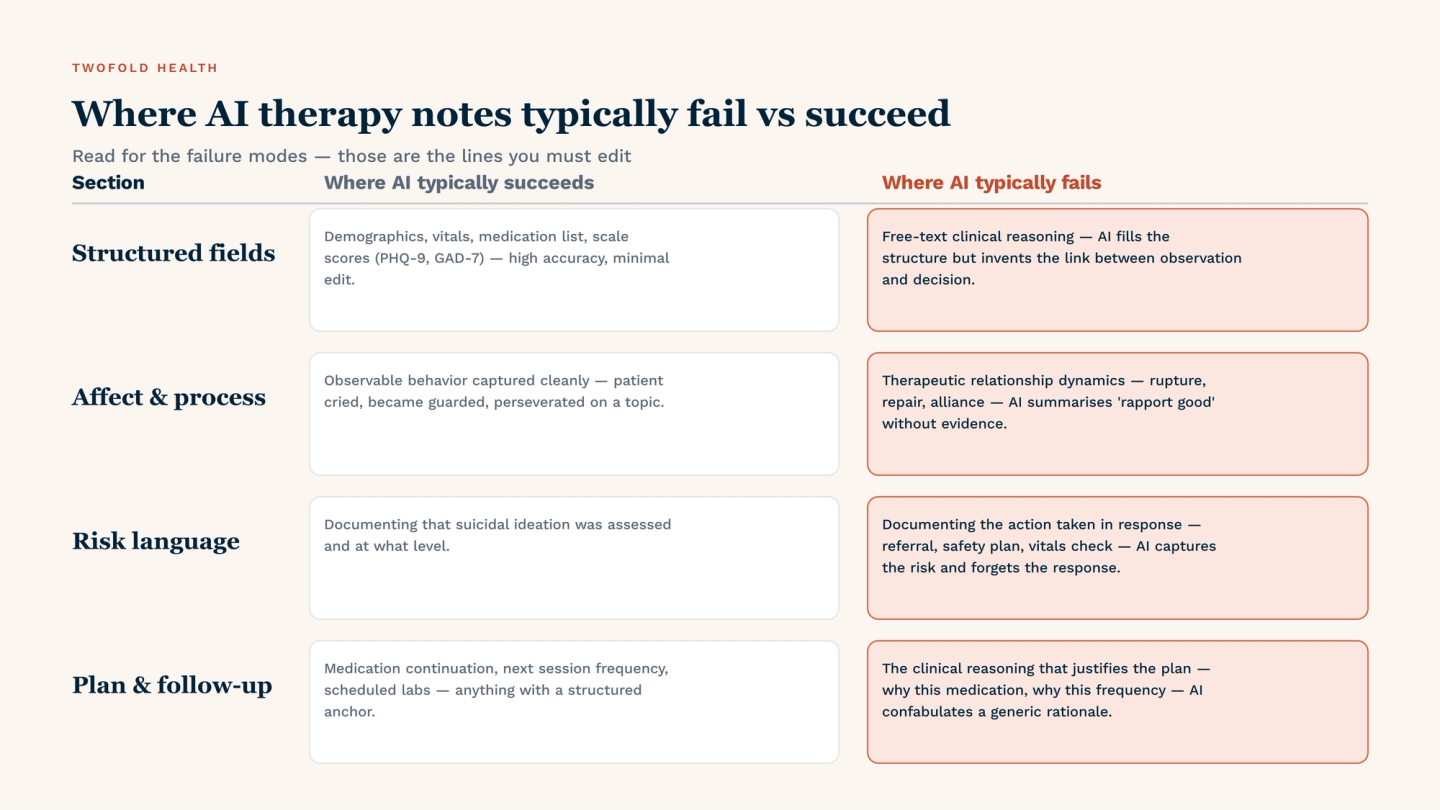
Where AI therapy notes typically fail vs succeed across four section types. Structured fields: succeed on demographics, vitals, medication list, and scale scores (PHQ-9, GAD-7); fail on free-text clinical reasoning where AI invents the link between observation and decision. Affect and process: succeed on observable behavior; fail on therapeutic relationship dynamics (rupture, repair, alliance) — AI summarises 'rapport good' without evidence. Risk language: succeed at documenting that suicidal ideation was assessed and at what level; fail at documenting the action taken in response — AI captures the risk and forgets the response. Plan and follow-up: succeed on medication continuation and structured frequency; fail on the clinical reasoning that justifies the plan — AI confabulates a generic rationale.

Where AI Therapy Notes Typically Fail vs. Succeed

The table below helps you quickly decide where to spend your editing time. Higher priority areas (red/yellow) deserve the bulk of your attention.

Clinical Element

AI Accuracy Rate

Human Review Priority

Objective Behaviors (fidgeting, eye contact)

High

Low (Quick skim)

Theoretical Interventions (CBT, DBT, EMDR phase)

Medium

Medium (Check alignment with your specific modality)

Subtle Affect Shifts (tears, sighing, voice tremors)

Low

High (Manually add sighs, silence, tears, body language shifts, etc.)

Risk & Safety Indicators (SI/HI, self-harm, abuse disclosures)

Variable (often missed)

High (Verify verbatim client language)

Step 3: Preserving Context While Editing

Once you’ve triaged the AI therapy note using the traffic light system, the next challenge is restoring clinical context without slowing down. Speed and depth are not opposites; they align when you use targeted edits that capture the why behind the client’s presentation.

The most efficient way to add context is to anchor every observational sentence to a cause, trigger, or meaning:

Editing Technique

Best Use Case

Verbatim insertion (Client's exact words)

Capturing risk statements, key beliefs, or contradictory language

Linking observation to trigger

Connecting affect to antecedent events or relational patterns

Affect labeling (naming the specific emotion AI missed)

Replacing generic “emotional distress” with shame, rage, grief, etc.

Behavioral specification (describing what “distressed” looked like)

Adding observable data (e.g., posture, tone, pace) that AI cannot infer

Chronological marker (noting when the shift occurred)

Clarifying sequencing of topics or interventions

Cultural or contextual footnote (e.g., religious holiday, family dynamic)

Adding nuance that AI lacks training data for

By pairing your pre‑session memory refresh with these editing techniques, you preserve the therapeutic nuance without drifting into full manual rewriting.

Conclusion

Editing AI therapy notes doesn’t have to sacrifice clinical depth for speed. The workflow you’ve just learned, refreshing your memory first, triaging with the traffic light system, and adding context in seconds, transforms AI output into a defensible, nuanced note. Speed comes from systems, and by spending 5 minutes on mental checkpoints, triage, and editing techniques, you can finish a full note without losing a single critical detail.


References

Bernstein, J. (2024, May 6). Want to Stop Overreacting? Try Affect Labeling. Psychology Today.

Michler, F. (2021, October 12). The 6 Critical Parts of Most Modern Therapy Sessions. Psychology Today.

Yancey, C. (2023, August 28). Emergency Department Triage - StatPearls - NCBI Bookshelf. NCBI.

Zauderer, S. (2025, August 4). The Role of Antecedent Strategies in ABA Therapy. Cross River Therapy.

FAQ

Frequently asked questions

  • Are AI therapy notes HIPAA-compliant and safe to use in my EHR?

    Yes, provided you use a HIPAA-compliant AI note platform and follow a documented review process before signing.

    • Vendor Responsibility: Choose AI tools that sign Business Associate Agreements (BAAs) and encrypt data in transit and at rest.
    • Clinician Responsibility: You must review, edit, and approve every AI-generated note. Unedited AI output does not meet clinical or legal standards.
    • Risk Mitigation: Your review workflow serves as a legal safeguard, demonstrating that a licensed professional verified the note’s accuracy.

    See how to vet AI therapy note tools for HIPAA compliance.


  • How do I handle sensitive content (trauma, SI, abuse disclosures) when using AI therapy notes?

    Sensitive content requires the highest level of human oversight. AI should never be trusted to accurately capture or appropriately phrase risk‑related material without your direct editing.

    • Do Not Rely On AI Transcription: For disclosures of suicidal ideation, self-harm, or abuse, write or paste the client’s verbatim language directly from your memory refresh notes.
    • Override AI’s Generic Phrasing: AI often omits risk indicators. Replace phrases like “client expressed distress” with the actual statement (e.g., “client stated, ‘I just don’t want to be here anymore!’”).
    • Red-flag Priority: In the traffic light method, risk and safety indicators are always Red (Rewrite).
    • De-identification Check: Before saving to your EHR, ensure no identifying information about third parties remains unless clinically necessary.

    See best practices for documenting risk language with AI assistance.


  • What clinical context do AI therapy notes most often miss, and how do I catch it during review?

    AI therapy note tools can miss subtle, non‑verbal, and relational context, elements that are often the most clinically significant, such as:

    • Affect Shifts: AI rarely captures fleeting changes in tone, tearfulness, voice volume, or prolonged silence unless explicitly described.
    • Relational Dynamics: Therapeutic alliance cues (e.g., client withdrawing after a question, responding with sarcasm) are typically absent.
    • Body Language: Posture changes, fidgeting, crossed arms, or avoidance of eye contact are seldom noted by AI.
    • Contradictions: AI may not flag when a client’s verbal content contradicts their nonverbal behavior (e.g., saying “I’m fine” while crying).
    • How to Catch it: Use the post-session memory refresh (Step 1) to jot down 3–5 bullet points on these missed elements. During the Red (Rewrite) phase of the traffic light method, manually add these observations where the AI left them blank.

    Learn more about what AI should and should not capture in AI therapy notes.