



To cancel Heidi Health, sign in to the Heidi web app, open Settings → Billing, select Manage Billing, and follow the cancellation flow. You keep access to your current plan's features until the end of your billing cycle, and on an annual plan you won't be charged for the next year — but Heidi does not refund the unused months you've already prepaid. If you only want to stop paying, you don't have to cancel outright: because Heidi has a free tier, you can downgrade to Free instead and keep your account and data.
This guide covers the exact cancel and downgrade steps, what you lose on the Free plan, how the refund and billing timing work, and how to switch to a new AI scribe without a gap in your documentation.
Disclosure: this guide is published by Twofold Health, an AI scribe many clinicians choose as a Heidi alternative. Every Heidi policy detail below is drawn from Heidi's official help center, linked in Sources, and was last verified in July 2026. Heidi restructured its pricing and plan names in early 2026 — confirm current plans and prices on Heidi's site before you act.
Cancel or Downgrade? Decide First
Heidi is unusual among paid scribes in offering a genuine free tier, which means you have two ways to stop paying — and they are not the same decision:
- Downgrade to Free — keep your Heidi account, templates, and past notes, but drop to the Free plan's limits (most importantly, 10 Pro Actions per month for advanced features). Best if you want a fallback account or occasional light use.
- Cancel entirely — end the paid subscription. You keep access until the end of the current billing cycle, then the paid features stop. Best if you're leaving Heidi for another tool.
If you're switching scribes, most clinicians cancel. If you're unsure, downgrading to Free is the lower‑risk move — you can always re‑upgrade, and you keep the account while you trial a replacement.
How to Cancel Heidi Health (Step by Step)
How to Downgrade From a Paid Heidi Plan to Free
If you'd rather keep a Heidi account than cancel outright, downgrade instead:
One important detail from Heidi's help center: plan changes such as downgrades apply at renewal, and unused months of a prepaid annual subscription are not refunded. So downgrading mid‑term doesn't claw back what you've already paid.
Does Heidi Health Give Refunds?
Heidi lets you cancel at any time and keeps your access running until the end of the billing cycle, but it does not refund unused prepaid time. On a monthly plan that's a non‑issue — you simply aren't billed again. On an annual plan, cancelling or downgrading mid‑term means the remaining months are a sunk cost: you keep access until the term ends, but the money isn't returned. If you believe you were charged in error — for example, a renewal that went through after you cancelled — contact Heidi support and keep your written cancellation confirmation on hand.
What You Lose on the Free Plan
Downgrading to Free keeps your account alive, but the Free tier is built for light use. The limits that matter most for a working clinician:
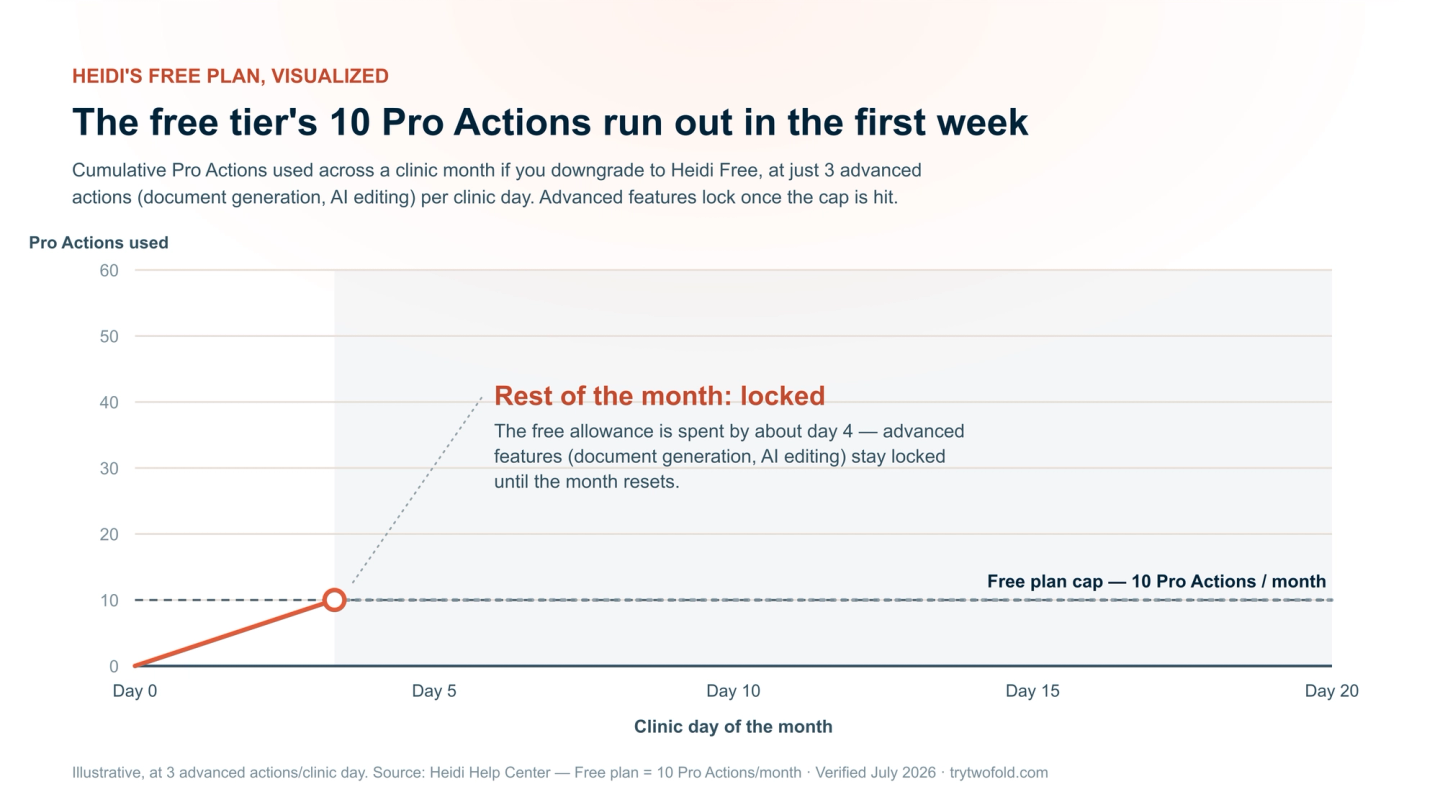
- Pro Actions capped at 10 per month — advanced features like document generation and AI editing draw from this allowance, and a normal caseload exhausts it within the first few clinic days.
- Advanced and custom template capabilities are gated once the Pro Action allowance runs out.
- EHR push-to-chart integrations aren't part of the Free experience — you're back to copy-paste.
- Team features (shared templates, team management) are not available on Free.
In practice, that means a full‑time clinician who downgrades to Free is locked out of the advanced features for most of the month. That's the moment most people decide whether to re‑upgrade — or move to a tool that doesn't meter advanced actions at all.
Before You Cancel: A 10-Minute Checklist
Why Clinicians Leave Heidi
Heidi is a strong, well‑liked ambient scribe with a generous free tier. But a few recurring themes push clinicians to cancel or switch:
- The 2026 pricing restructure — Heidi raised prices and reshuffled plan names in early 2026, prompting clinicians to re-evaluate at renewal.
- Metered advanced features — the Free plan's 10 Pro Actions/month and the gating of advanced actions frustrate clinicians who want everything included.
- Reliability complaints — Heidi drew a wave of reports about lost or dropped sessions in 2026, which is disruptive mid-visit.
- Mental-health depth — behavioral-health clinicians often want treatment plans, progress tracking across sessions, and therapy-native formats beyond a general scribe.
For the full picture, see our Heidi vs Twofold comparison and the Heidi Health pricing guide.
Choosing a Replacement: What to Compare
Whatever you move to, judge it on the reasons you're leaving Heidi — not a feature checklist:
- Everything included, no metering — no monthly cap on advanced actions like document generation or AI editing.
- Predictable flat pricing — a price that doesn't jump with a mid-year restructure.
- Notes in your clinical voice — the tool should learn your phrasing, not force a template.
- Specialty depth — especially for behavioral health: SOAP, DAP, BIRP, GIRP, treatment plans, and progress tracking across sessions.
- Reliability — capture that doesn't drop sessions mid-visit.
- Security posture — a signed BAA on every plan, and clarity on whether audio is stored.
- A trial you can run before your Heidi access ends — ideally without a credit card.
Where Twofold Stands as the Heidi Alternative
Twofold Health is built around exactly these friction points, which is why it consistently tops our and third‑party Heidi alternative rankings. There are no metered Pro Actions — document generation, AI editing, and unlimited notes are included on every paid plan. It learns your clinical voice over your first few sessions, supports ambient, dictation, and typed‑summary capture, and adds the mental‑health depth (treatment plans, progress tracking, DAP/BIRP/GIRP and 70+ templates) that general scribes treat as an afterthought. Every account gets a signed BAA, audio is never stored, and it works alongside any EHR.
What switchers check | Heidi | Twofold |
|---|---|---|
Advanced actions | Metered — Free capped at 10 Pro Actions/month; gated by tier | Unlimited — document generation & AI editing included |
Notes | Unlimited transcription; advanced features metered | Unlimited notes on every paid plan |
Capture modes | Ambient recording | Ambient, dictation, or typed summary |
Clinical voice | Templates + Ask Heidi | Learns your phrasing and detail level |
Mental-health depth | General templates | 70+ templates incl. DAP/BIRP/GIRP, treatment plans, progress tracking |
Pricing | Restructured & raised in early 2026 | Flat, predictable pricing |
HIPAA / BAA | HIPAA compliant | HIPAA compliant; signed BAA on every plan; audio never stored |
Trial | Free tier + timed trial | 7-day free trial, no card required |
Heidi and Twofold pricing/features above were last verified in July 2026 on each vendor's site — Heidi's plans and prices changed in early 2026, so check current details before you commit.
For the wider field, our Best Heidi AI alternatives roundup and Best overall Heidi alternative analysis go deeper.
Use Your Remaining Heidi Access to Test the Switch
Because Heidi access runs to the end of your billing cycle, you can evaluate a replacement side by side on real visits with zero documentation gap:
Bottom Line
Cancelling Heidi takes a couple of minutes: Settings → Billing → Manage Billing → follow the cancellation flow. If you only want to stop paying, downgrade to Free instead and keep your account. Either way, the decisions that matter are timing — act before renewal, because unused annual months aren't refunded — and continuity: secure your notes, save your templates, and trial the replacement while your access is still live. If Heidi's metered Pro Actions, the 2026 price increase, or reliability are why you're leaving, start a Twofold trial during your remaining Heidi window and compare them on your own visits.