


Switching from Heidi to Twofold takes about a week with no documentation gap: start Twofold's 7‑day no‑card trial while your Heidi subscription is still active, recreate your two or three most‑used templates in Twofold, run both tools on the same visits for a few days, confirm your notes flow into your EHR, then cancel Heidi before its renewal date (or downgrade to its free tier as a fallback). Your finished notes were never at risk — they already live in your chart — so migration is really a template rebuild plus a few sessions of style learning.
This guide maps your Heidi workflow to its Twofold equivalent, shows how to recreate your templates, and lays out a day‑by‑day plan. If you're still deciding, start with our comparison instead; this is the execution playbook for clinicians who've already chosen to move.
Disclosure: this guide is published by Twofold Health. Heidi details are from Heidi's help center and Twofold details from trytwofold.com, both verified July 2026. Heidi restructured pricing in early 2026 — confirm current terms before you act.
Heidi → Twofold: What Maps to What
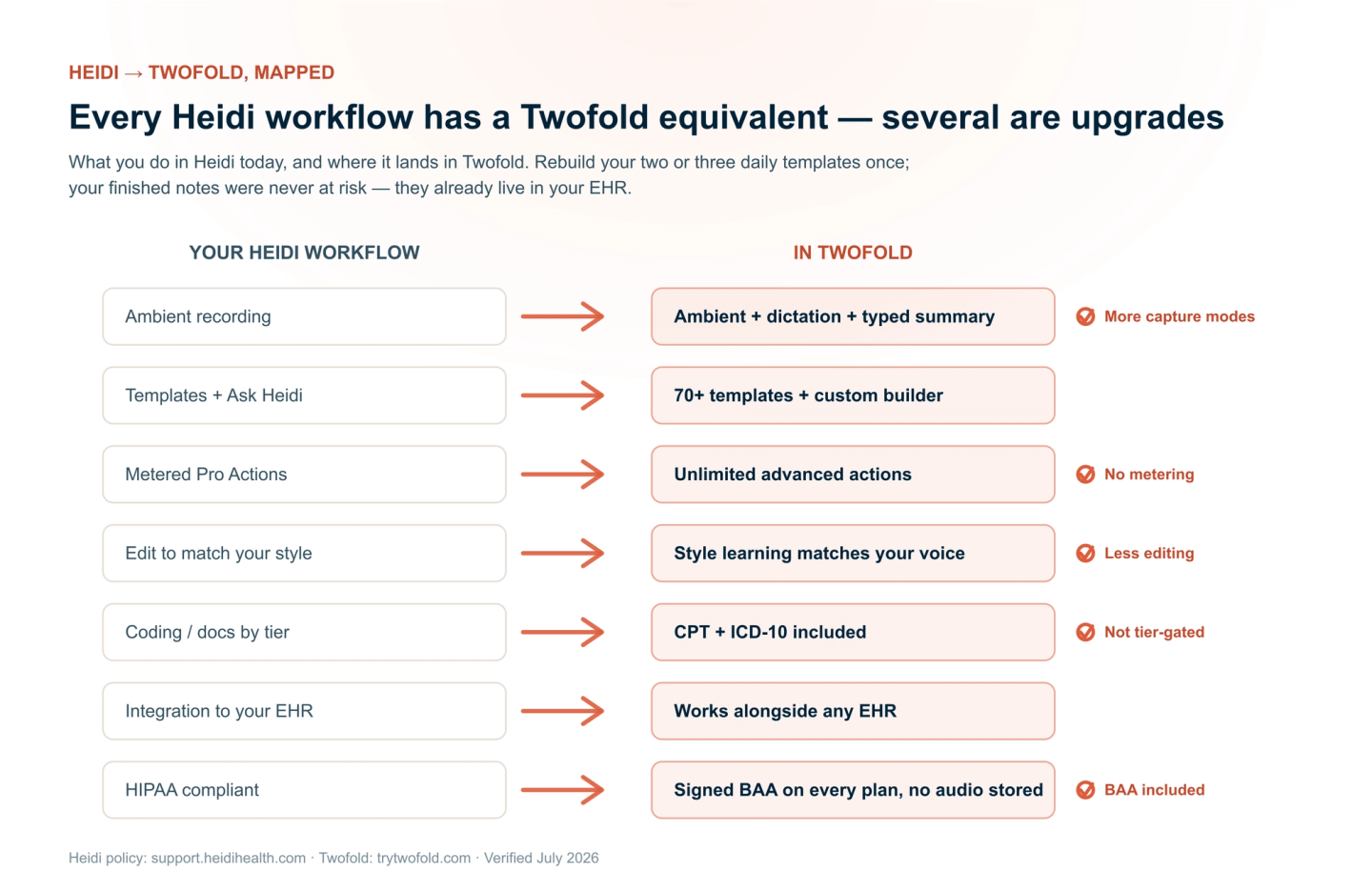
Most of your Heidi workflow has a direct Twofold equivalent, and a few things get better. The mapping:
Your Heidi workflow | In Twofold | What changes |
|---|---|---|
Ambient recording of the visit | Ambient recording — plus dictation or a typed summary | More capture options for visits you don't record |
Templates + Ask Heidi | 70+ templates + custom template builder | Rebuild your daily templates once; more specialty formats |
Metered Pro Actions (advanced features) | Unlimited notes and advanced actions on every paid plan | No metering to manage |
Editing to match your style | Style learning that matches your voice over sessions | Less editing over time |
Coding / documents by tier | CPT and ICD-10 coding included | Included, not tier-gated |
Copy-paste / integration to your EHR | Works alongside any EHR | Same EHR, no platform switch |
HIPAA compliance | Signed BAA on every plan; audio never stored | BAA included on every plan |
Step 1: Start Twofold in Parallel (Don't Cancel Heidi Yet)
Begin the Twofold trial — it's 7 days and needs no credit card, so it runs alongside your active Heidi subscription with no double‑billing. Sign your BAA before recording a real patient so you're covered for PHI from the first visit.
Step 2: Recreate Your Templates
Templates don't transfer between vendors, but rebuilding is quick — do your two or three most‑used first, since they cover most of your day:
Step 3: Run Both Tools on the Same Visits
For three to five days, generate each note in both Heidi and Twofold and compare the only metric that matters: minutes from end of visit to signed note. This is also when Twofold's style learning kicks in — edit the first few notes and it starts matching your phrasing and detail level. Because Twofold doesn't meter advanced actions, you can lean on document generation and AI editing as much as you like during the trial.
Step 4: Confirm Your EHR Flow
Twofold works alongside any EHR, so confirm the handoff you need — copy‑paste or your usual workflow — puts the finished note into the chart cleanly. Your EHR remains the legal record; verify recent notes are landing there before you rely on Twofold alone.
Step 5: Cancel Heidi Before It Renews
Once Twofold is carrying your visits, cancel Heidi before its renewal date — Heidi doesn't refund unused prepaid months, so timing matters. Follow our step-by-step Heidi cancellation guide (Settings → Billing → Manage Billing → cancel). If you'd rather keep a fallback account, downgrade to Heidi's free tier instead — though its 10 Pro Actions/month run out fast. Either way, copy out any unfinished drafts and end the Heidi BAA.
The 7-Day Heidi-to-Twofold Timeline
Why Clinicians Make the Switch
The Heidi switchers who land on Twofold usually cite the same wins: unlimited notes and advanced actions with no Pro Action metering, flat pricing that didn't jump in the 2026 restructure, notes that sound like them (so less editing), and behavioral‑health depth Heidi doesn't match. Add a signed BAA on every plan, audio that's never stored, and an EHR‑agnostic workflow, and the switch is low‑risk and quick.
Want the side‑by‑side first? See our Heidi vs Twofold comparison and the vendor‑neutral guide to switching AI scribes.
Bottom Line
Moving from Heidi to Twofold is a one‑week, no‑gap migration: trial Twofold in parallel, rebuild your handful of templates, compare on real visits, confirm your EHR flow, and cancel Heidi before it renews. Your notes live in the chart the whole time, so nothing is at risk. Start your Twofold trial during your remaining Heidi access and make the switch on your own visits.